1. When i start adding units to the looked up values, Weight, Ag, works fine as shown below. But once Ii add a unit "in" to bf or to the rest i get an error, as shown in the second picture
2. Instead of typing the section size, is there an easy way to create a combo box of all the sections without typing in all the sizes inside the combo box
There is no way to save in the format of an older version. You would have to open both versions side by side and copy - but not in one go, but every region on its own - Thank you, PTC! 😞
So you see that its important to say which Prime version you are using - especially if you are not using the latest one.
According the list box - scripted advanced controls were introduced in Prime 10, so they are not available in Prime 9.
That said I fear that there is no easy way to achieve what you asked for in Prime 9.
A combo box allows values to be copied from a vector, but copy & paste is severely broken in Prime (some may say its just implemented in an idiotic way). The combo box does not allow to copy the data from Excel directly. You may copy from a prime table, but only the portion you see on one page (select only the data, not the complete table). Once you scroll you can't expand the selection. You may copy a vector (you can select the whole vector this time), but only the data visible will be copied.
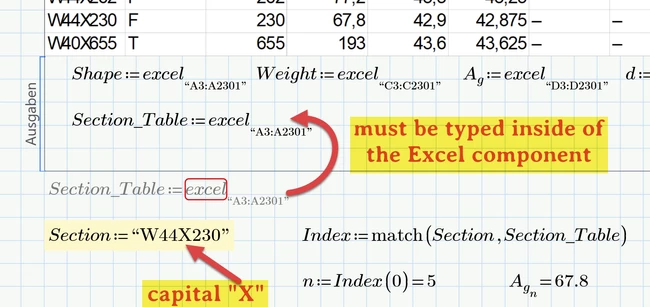
In the attached Prime 9 sheet I expanded the vector Selection_Table so it shows about 208 values and was able to copy them to the combo box. I guess it may be possible to attach data by scrolling the vector (also implemented in a very silly manner) and copying the next bunch of data. But in any case it will be very tedious to get all 2299 values to the combo box (and I don't know if the combo box has a limit of values...).
Last option would be to modify the Prime file via an external program you have to write. A Prime file is a ZIP file and once you rename it to .ZIP you can look inside and amongst others will find a file with the name worksheet.xml. This file contains all regions of your Prime sheet coded in XML format and you will also find the combo box with the 208 entries I created. You may invastigate how the format is and append all the necessary data. Save back the file, rename the zip archive to .mcdx and when you open it you may see the combo box with all the 2299 entries.
I vaguely remember that @terryhendicott once posted that kind of solution for a similar question. I guess it was at times where no advanced controls were available.