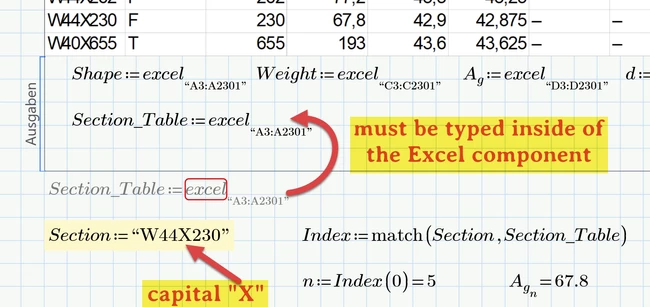
1. When i start adding units to the looked up values, Weight, Ag, works fine as shown below. But once Ii add a unit "in" to bf or to the rest i get an error, as shown in the second picture
2. Instead of typing the section size, is there an easy way to create a combo box of all the sections without typing in all the sizes inside the combo box
Adding unit "in" to d fails because this vector does not consist of values alone but also contains a lot of strings like "-", starting at index 1534.
Even worse with b.f, where most values are strings, already starting at index 427.
Prime does not allow to assign a unit to a string. Basically assigning a unit means a multiplication and you can't multiply a string with a number.
So you either shorten the vector or you may omit the unit in the Excel component and use a small utility program which replaces the strings by NaNs. Assigning a unit to NaN is allowed (and sometimes even necessary).
The utility function could be used for other vectors as well, of course.
According the combo box. No, the combo box is not scriptable.
But you could use a list box from the advanced controls. Use variable "Section_Table" as Input and a script which copies the entries of the input vector to the listbox via "Listbox.addstring(...)".
A simple example is given in the attached sheet. As far as I remember more sophisticated version were posted here in the forum in the past now and then