4-Participant
October 7, 2017
Solved

Results of indefinite integral is different in MathCAD and MathCAD Prime

  • October 7, 2017
  • 3 replies
  • 2870 views

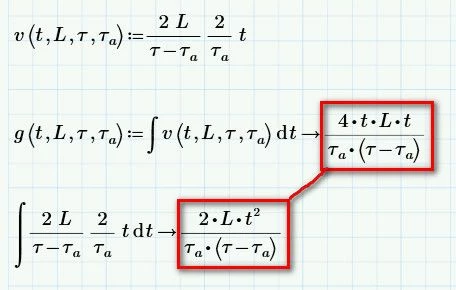
result in Mathcad 15 M045 and in Mathcad Prime 4.0
 

1.jpg2.jpg


Best answer by LucMeekes

Check the labels of the t's in the indefinite integral:

- the one as argument of the function v(t,...) within the integral => this one is labelled as a 'variable'

- and the integration variable t (the one following the d) => this one is labelled as an 'automatic'.

They are differently labelled, so they are seen as different variables and (only then !) the integration result makes sense.


In the other integral (not using v() but the function directly) both t's are 'automatic' variables and therefore (seen as) the same.


This autolabelling feature of Prime is often a blessing, sometimes the opposite. You can help yourself by choosing distinctive looks (fonts and/or colours) for each of the different labels to clearly show the difference between differently labelled items.


Success!

Luc

3 replies

1-Visitor
October 7, 2017

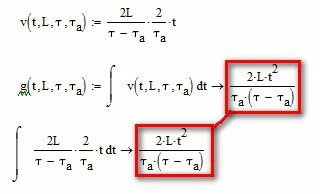
No difference in Mathcad Prime 3.1.

int21.png

SeanYing4-ParticipantAuthor
4-Participant
October 7, 2017
Thanks. But did you try it in Prime 4.0?
24-Ruby IV
October 7, 2017

int-diff.png

LucMeekes23-Emerald IVAnswer
23-Emerald IV
October 7, 2017

Check the labels of the t's in the indefinite integral:

- the one as argument of the function v(t,...) within the integral => this one is labelled as a 'variable'

- and the integration variable t (the one following the d) => this one is labelled as an 'automatic'.

They are differently labelled, so they are seen as different variables and (only then !) the integration result makes sense.


In the other integral (not using v() but the function directly) both t's are 'automatic' variables and therefore (seen as) the same.


This autolabelling feature of Prime is often a blessing, sometimes the opposite. You can help yourself by choosing distinctive looks (fonts and/or colours) for each of the different labels to clearly show the difference between differently labelled items.


Success!

Luc

SeanYing4-ParticipantAuthor
4-Participant
October 8, 2017

I really hope the next version f Prime will automatically use

"distinctive looks (fonts and/or colours) for each of the different labels to clearly show the difference between differently labelled items."

23-Emerald IV
October 8, 2017

You should not need to wait for a new version of Prime. You can change the appearance yourself, see the 'Math formatting' tab.
Luc


P.S.

Ah, I see you cannot change the appearance of the 'automatic' labelled item's. Then changing the colour of the 'variable' should do it.

While you're adjusting. The International Standard ISO 80000 requires that unit names (like m, Hz and N) must be written in an upright (not italic) font.