
15-Moonstone
December 27, 2022
Solved

Sici spiral, create graphic

  • December 27, 2022
  • 1 reply
  • 3809 views

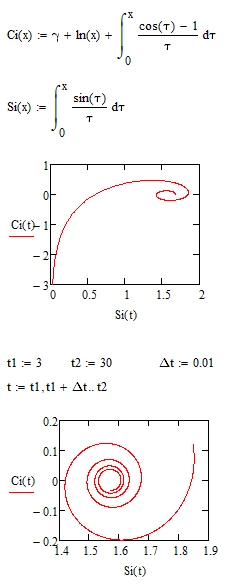
Between Christmas and New Year's I want to "play" with curves on graphs in Mathcad 14. I am particularly interested in the graphical representation of the Sici spiral (or named after Nielsen). It is represented parameterized in the Cartesian x-y coordinate system by x=Si(t) and y=Ci(t) with t>0. The Si and Ci functions are found in Mathcad on the f(x) menu. But they don't work in the diagram, even though I followed the instructions from the "Help". That's why I didn't attach a test file here. What am I doing wrong?

Kind regards, Alfred Flasshaar
Best answer by Werner_E

Of course you can redefine the function and evaluate the necessary integrals numerically that way:

Werner_E_3-1672161514856.png


1 reply

25-Diamond I
December 27, 2022

As the help states, Si() and Ci() are symbolic only functions. They cannot be evaluated numerically and plotting requires numeric evaluation.

Werner_E_0-1672161020791.png


Werner_E25-Diamond IAnswer
25-Diamond I
December 27, 2022

Of course you can redefine the function and evaluate the necessary integrals numerically that way:

Werner_E_3-1672161514856.png


25-Diamond I
December 29, 2022

Animations in Mathcad are quite simple. When you animate, all that happens is that a variable FRAME is looped. Start and end value can be set in the animation popup window - in case of my animations you should chose 0 for "From" and the value you assigned for my variable MAXFRAMES in the "To" field.

All that Mathcad does is to calculate the sheet (or at least the area you had chosen for animation) for every value of FRAME, takes a pic and appends all to an avi movie. Its up to you to use FRAME so that the animation shows what you want.

Now for your question: By default, when you edit your sheet, FRAME has the value 0. Is is only incremented when you start the creation of an animation. In the worksheet you refer to there is not much to be seen when FRAME=0, so I manually set FRAME to a higher value to be able to see if the plot does what I intend it to do. To be able to set it right next to the plot I used a global assignment. If you don't delete or disable this assignment, FRAME is not iterated by the animation and you will see no change.


BTW, the codec used by Mathcad for the avi-file is very old and (at least in the past) this forum refused movies which used that codec (at those time the forum even refused Mathcad files so they had to be zipped zu be able to upload them - at least this is fixed in the meantime).

So to be of use here, the movie would have to be converted by some program. But the animations you see in my and Luc's posts are just animated gifs - so you can't pause them or watch them frame by frame. I use an online converter to do the job of turning the avi into a gif.