
10-Marble
July 31, 2025
Solved

Silly, basic question - What is the green question mark in front of 'include' statements (Prime v11)

  • July 31, 2025
  • 2 replies
  • 616 views

I can only find one question posed on this and the meaning of the green question mark wasn't provided. Nothing in the online help either. Mathcad also indicates that there are errors in the included document, but there aren't. Wasn't sure if the green ! was related to that.


The included/reference document expects to see some values defined before it because the included document does calculations based on the pre-defined values. So in actual use with required variable definitions provided prior to insertion of reference doc, everything should be fine. When you drill down into the reference document, Mathcad acts like it knows nothing about the previously defined variable (which sort of makes sense) and gives me errors (red boxes) on some of the calculations


I can't remember, but I thought Mathcad v15 had an "if defined..." function so you could make local definitions if something wasn't already defined. Am I remembering correctly? I haven't seen such a function in Prime (v11). TIA
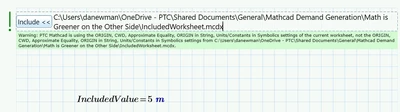
Best answer by DJNewman

DJNewman_0-1753979699083.png


So you can actually click on it to see what the green exclamation point is talking about. In this case, the worksheet settings (Calculation -> Worksheet Settings) between the sheet you included and the sheet it's included in are different.

2 replies

DJNewman
DJNewman18-OpalAnswer
18-Opal
July 31, 2025

DJNewman_0-1753979699083.png


So you can actually click on it to see what the green exclamation point is talking about. In this case, the worksheet settings (Calculation -> Worksheet Settings) between the sheet you included and the sheet it's included in are different.

PTC Marketer Creo and Mathcad. I run their YouTube channels, some Creo campaigns, and all Mathcad campaigns and communications.
krs10-MarbleAuthor
10-Marble
July 31, 2025

Yes, I've seen the green box explaining possible differences to the user, but silly me, never connected that that was connected to the green exclamation point. To be clear, the exclamation point is not clickable, but the include box is and that's when the warning comes up. I guess the exclamation point is letting the user know that there is something to be investigated? Like I said, silly, basic question. Thanks

DJNewman
18-Opal
July 31, 2025

If you make the settings on the two worksheets the same, the green ! goes away.

PTC Marketer Creo and Mathcad. I run their YouTube channels, some Creo campaigns, and all Mathcad campaigns and communications.
25-Diamond I
July 31, 2025

According the "if defined ..."

I can't remember that kind of function in MC15 but it sure would be great if something like it would be integrated in future Prime versions.