
10-Marble
June 13, 2019
Solved

Skip Blank Rows in READEXCEL

  • June 13, 2019
  • 4 replies
  • 4985 views


Hello Community,


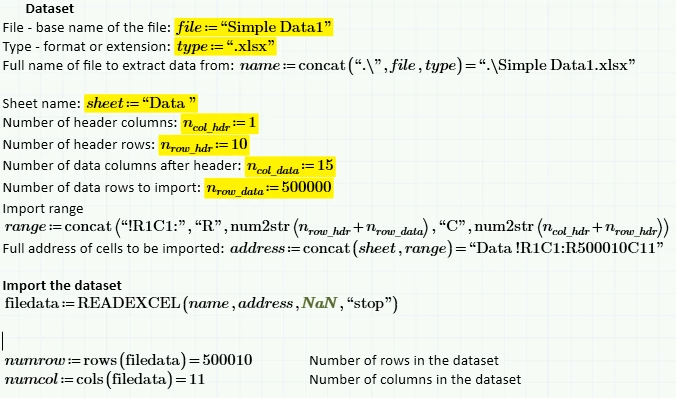
I am working on a Mathcad Prime 5.0.0 worksheet. My goal is to import data from Excel, and later in my worksheet run data analysis for the found set.  I am struggling a bit to emulate the behavior for CSVs where the imported data is limited to non-blank rows and columns (once it finds the empty rows and columns it automatically stops importing). The help indicates a way to command READEXCEL to "stop" on a blank row. The problem is that I cannot get it to work. Maybe the previous emptyfill parameter where you fill blanks with something is preventing the "stop" on blank? I cannot figure out how to make it work, and all of the examples use only the most basic inputs.  Any ideas?


The screenshot shown below shows that though I try to "stop" on blankrows, it is persisting; I get all 500010 rows even though there are only 180k lines of data.  Perhaps the substitute of NaN is the issue? I have also specified "" as the emptyfill and gotten the same result.
 

Import.PNG


Best answer by tietjee

I had a similar problem but in the columns, which is easier. 


I believe READEXCEL stops when it hits a zero row.  I would start with the following steps.

Try reading the entire excel worksheet

Count the rows in Prime

Start a new READEXCEL starting at A:row+1.  Prime origin is one less than Excel

Stack the two matrices

Count the rows in Prime.

Start a new READEXCEL starting at A:row+2

Continue this process until you get a matrix that is all zeros or row equals 1.

The one concern is if the Excel data has two rows that are zeros.

With 500,000 data rows, it may be worth the time to write a program to read the excel sheet

Hope this helps,

David

4 replies

16-Pearl
June 14, 2019

Is FilterNAN what you're looking for?

10-Marble
June 14, 2019

I don't think so. I want to define a wide range of both rows and columns, and have the import, at least for rows, stop once it runs out of data.  That is, even though I have defined 500k rows, if blank rows start at 180k the import should stop.

21-Topaz II
June 14, 2019

Hi,


Here is a sample excel imported into Mathcad.  It shows what happens with Nan's and "stop"  You can easily see using this sample file what READEXCEL does.

Capture.PNG


Capture-2.PNG

10-Marble
June 14, 2019

Terry,


It looks like your solution is substituting the string "stop" as emptyfill, and I see the program doing that; filling the empty cells with a string.


For my program, I would like to specify a fairly unbound end row. My current code shows 500k but even better would be 10M. I want the data import to auto stop at the first empty row, and not actually run out to the range I specified.

21-Topaz II
June 14, 2019

Hi,


The ability to "stop" on an empty row seems to work with this small sample file. N is only two rows.

Capture.PNG

Capture-2.PNG


tietjee15-MoonstoneAnswer
15-Moonstone
June 14, 2019

I had a similar problem but in the columns, which is easier. 


I believe READEXCEL stops when it hits a zero row.  I would start with the following steps.

Try reading the entire excel worksheet

Count the rows in Prime

Start a new READEXCEL starting at A:row+1.  Prime origin is one less than Excel

Stack the two matrices

Count the rows in Prime.

Start a new READEXCEL starting at A:row+2

Continue this process until you get a matrix that is all zeros or row equals 1.

The one concern is if the Excel data has two rows that are zeros.

With 500,000 data rows, it may be worth the time to write a program to read the excel sheet

Hope this helps,

David

25-Diamond I
June 14, 2019

The syntax you use is correct and should work (and indeed does so in a small example file I created)

basically Terrys lat post shows that, too. You may replace the string "blank" in his example by NaN.

So if it does not work with your Excel sheet, it might be that the row you think is empty in reality contains some hidden data and so is not seen as empty by Mathcad.

You should create a smaller sample Excel file and post it here along with your Prime worksheet.