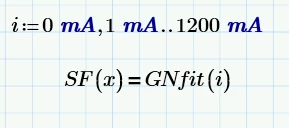
"find" has to be used in a solve block, yes. An alternative is using the root() function.
Here is what I guess is a solution using a solve block with find.
You could have provided a simple demo sheet with dummy functions so we would have also seen what the units of the functions and of x are supposed to be..
I defined some senseless functions here (the names of the formal arguments do not matter, I used x and y)
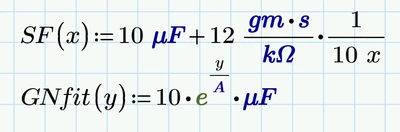
and the set up a solve block, turned into a function of i (again, the name could be anything)
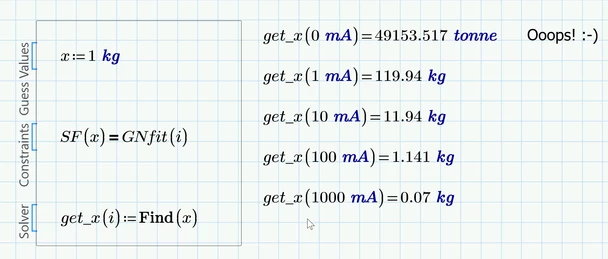
As you can see in the pic above you now have a function get_x() which returns the x-value for every i-value you provide.
Use it as any other function you know.
You can make a plot of x over i
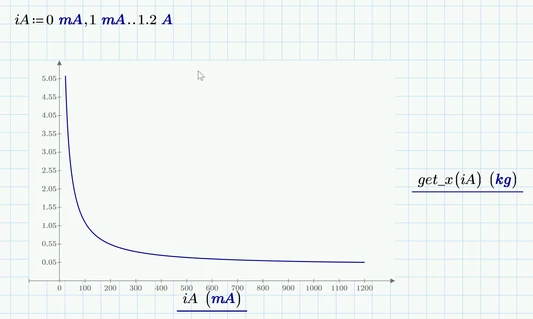
Note that iA is a range variable only used for plotting.
You have to distinguish between vectors and ranges. Ranges should only be used for
1) plotting (as above)
2) to index the elements of vectors or matrices
3) in a program when you use a for-loop
Never use ranges to create a table of values or the like!
ttokoro just had shown an undocumented trick to turn a range into a vector by following the assignment with an evaluation (the = at the end).
You may also create a vector in a more "legal" way, though.
Lets say we want a vector with 13 equally spaced values from 0mA to 1200mA. So the first step is to define a range i:=0..12 which then is used to index the vector ii we create:
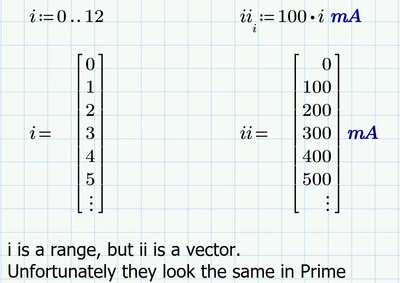
Note that in the definition if ii the index i is a vector/matrix index, not a literal index.
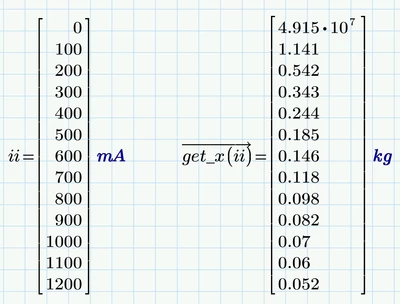
Now you can feed this vector as argument in the function get_x() but you have to use the vectorization operator (the arrow over the expression).
You may assign this to another variable or just display it side by side to ii so you see which i results in which x.
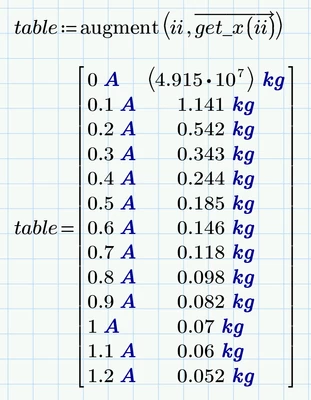
You may also use augment to create a matrix, but because the two columns use different dimensions/units, the units are displayed IN the matrix and unfortunately cannot be changed to something else - its the standard units only, so you can't
show mA
If a table is what you are looking for you might consider creating a table without unit by dividing each column by the unit you'd like the values to be in (just for fun I used lb for mass):
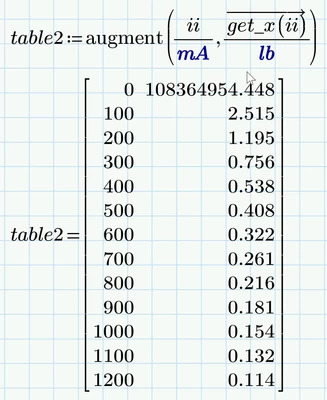
Feel free to add a descriptive header
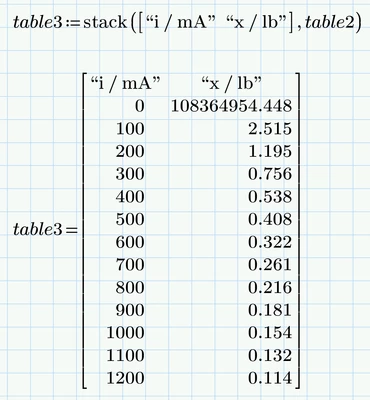
Of course you can create a vector ii with more values if needed, like the 1201 values you had initially set up

BTW, the aforementioned undocumented trick
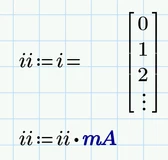
would create the very same vector ii.