1-Visitor
November 22, 2015
Solved

Solve non-trivial solution to a Matrix Function other than the solve block

  • November 22, 2015
  • 1 reply
  • 7249 views

Hi, everyone,

Capture.JPG

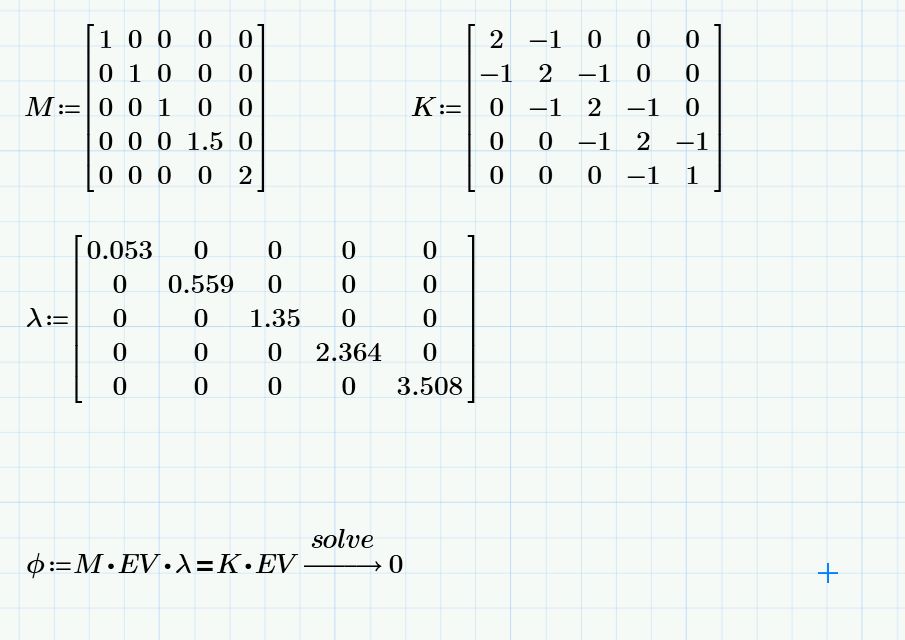
Right now I just want to find the non-trivial solution to the last equation above,

I can find that using the solve block, but since solve block cannot be used in programming,

I am afraid I have to find another way to solve a Matrix function with non trivial solution.

In Matlab, [eigenval, eigenvecs] = eig (K, M) would return to EV as eigenvecs, using the equation M*EV*lambda = K*EV, and it is easier for programming, say K & M varies.

So is there a way to solve non-trivial solution to a Matrix Function other than the solve block in Mathcad?

Thank you for your help!

Best

Shawn
Best answer by Werner_E

In Matlab, [eigenval, eigenvecs] = eig (K, M) can return to both lambda and corresponding EVs, but not sure how to achieve it in Mathcad.

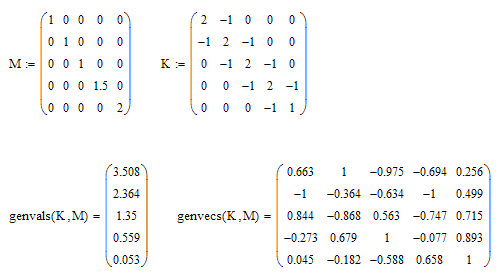
Would this help:

1 reply

25-Diamond I
November 22, 2015

Have you tried "solve, fully" ?

But as long as you don't tell Mathcad that EV should be a vector or matrix, you will just get 0 as solution as this is the only solution of this equation - Mathcad treats EV as a scalar.

sfan1-VisitorAuthor
1-Visitor
November 22, 2015

I tried "solve, fully", but did not work as well.

So is there a way to solve Matrix equation, without using Solve Block?

I just want to make some preparation for the future programming work, if there is.

In this problem, lambda matrix is the eigenvalues of D=K-lambda*M,

then, using the Eigenvecs cannot come out with the right EV.

That's why I use this equation M*EV*lambda = K*EV to find EV.

In Matlab, [eigenval, eigenvecs] = eig (K, M) can return to both lambda and corresponding EVs, but not sure how to achieve it in Mathcad.

19-Tanzanite
November 22, 2015

You can't put a solve block in a program, but you can turn a solve block into a function:

phi(K,M):=Find(EV)

Then you can call phi(K,M) in a program with different K and M,