1-Visitor
February 10, 2013
Solved

Symbolic Derivative Problem

  • February 10, 2013
  • 1 reply
  • 4055 views

Hello,

Please see the attached worksheet.

I need the actual derivative of vf(lambda,alpha) function. MathCad says it is too long to be shown.

Is there any way to overcome this issue?

Thank you so much.

Anousheh

Best answer by Werner_E

Anousheh Rouzbehani schrieb:

Hello,

Please see the attached worksheet.

I need the actual derivative of vf(lambda,alpha) function. MathCad says it is too long to be shown.

Where? I couldn't find that problem in you worksheet. Obviously I'm missing the point. Always better to post a stripped down worksheets which just shows the error or, as in your case, the undesired behaviour.

As you have defined Alpha at the top I assume you are interested in the derivative wrt lamda. I move the range variable for lamda down a bit.
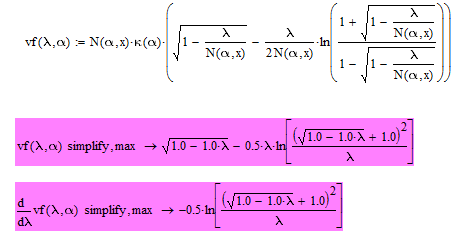
cohesive2.png

One way to look at an expression which Mathcad 15 says being to long is to convert the worksheet in Prime format and load it in Prime 2, if you have the possibility to do so. Prime would let you scroll - no, unfortunately not, but you are allowed to enlarge the expression region to the right.

1 reply

Werner_E25-Diamond IAnswer
25-Diamond I
February 10, 2013

Anousheh Rouzbehani schrieb:

Hello,

Please see the attached worksheet.

I need the actual derivative of vf(lambda,alpha) function. MathCad says it is too long to be shown.

Where? I couldn't find that problem in you worksheet. Obviously I'm missing the point. Always better to post a stripped down worksheets which just shows the error or, as in your case, the undesired behaviour.

As you have defined Alpha at the top I assume you are interested in the derivative wrt lamda. I move the range variable for lamda down a bit.

cohesive2.png

One way to look at an expression which Mathcad 15 says being to long is to convert the worksheet in Prime format and load it in Prime 2, if you have the possibility to do so. Prime would let you scroll - no, unfortunately not, but you are allowed to enlarge the expression region to the right.

12-Amethyst
February 10, 2013

Werner,

I was working on this at the same time. I was able to get the derivative when alpha = .5 as was assumed in the worksheet, but the evaluation doesn't complete in a long time when other values for alpha are used. The same happens with your suggestion for the modifiers. When alpa is treated as a variable without a value, then the long result occurs.

Anousheh showed plots with other values of alpha, so I assume there will be an interest in a more general result. Any ideas?

Harvey

25-Diamond I
February 11, 2013
1- What is the different between "simplify" with and without "max"?

with ",max" Mathcad tries a bit harder and sometimes comes up with an expression a little bit neater (also it sometimes needs alot more time with no added benefit). So just give it a try.

2- What is the little black rectangle at the top right corner of some blocks? Is it for not to display the results?

This means the evaluation of this region is disabled (right click - context menu). Those regeions are treated by Mathcad as if non existent. I've done this with your definition of alpha at the top to show, that this is now obsolete and with the second derivation (with alpha=0.45) as I didn't thought it would yield a nice and useable result with those unevaluated y(4/10,0.45) expressions. You may enable it as soon as you have changed that y(x) to a 1.

3- At the bottom of the worksheet, I see green border around the first graph (which I suppose means that it is working), but nothing happens. I have good processor and sufficient ram in my computer, so I don't know why it takes so long to settle down. (Still nothing happening!)

Yes, it means that Mathcad is busy evaluating that region. You may interrupt evaluation process by pressing "Esc". On loading Mathcad does not evaluate the whole sheet but only to the portion which is visible on the screen. So only if you scroll down Mathcad continues to evaluate. I guess that the evaluation of vf() is taking much much more time now as y(alpha,0.45) is reavaluating the whole solve block every time vf() is called. So it will finish after a (long) while. But in every case you should consider to change the calls to y() unless you really need y(x) for other values of x.

4- What do you mean by saying:

Werner Exinger wrote:

To overcome this you would have to turn the solve block in a function.

That was exactly the reason for posting that worksheet. I deleted (set inactive) the definition of alpha and made alpha a parameter of the function y. Look at the end of the solveblock, I have changed your y to an y(alpha) and so you have to call y with two parameters. This seemed necessary if you intended to change the value of x from 10 (where y yields 1 regardless of alpha) to another value (which then would be different for different alphas). Later I realized that using the function y in dependance of alpha in a symbolic evaluation (your wanted derivatives) is not that good an idea.

How do you like my technique of inserting quotes?!

Not sure what you mean?

Find attached a changed worksheet. The difference is that x is fixed to 10 and y to 1 in the definition of Beta. So the whole solve block would be obsolete