
17-Peridot
August 13, 2024
Solved

Text Box Collapse Left Side

  • August 13, 2024
  • 2 replies
  • 1458 views

Hi Guys,


I tried to enhance mathcad Prime's page counter as the counter does not allow starting with a page number other than 1. So I'm using a textbox as a page counter. In this textbox I have an input and an output. The counter shall increase by one on each consecutive page making it possible to combine several files into one. Or so I thought.

For some reason I can't hide or collapse the left side of the textbox which makes it appear ungainly. I've tried to hide it and to collapse it. To no avail.
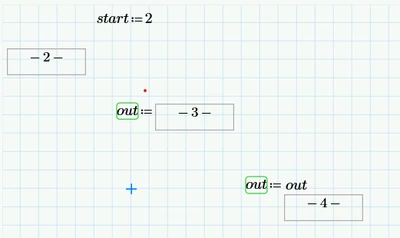
Raiko_0-1723559023336.png


Does anybody have an idea what I'm doing wrong?

Raiko

P.S.

I'd prefer to have this textbox in the footer, but prime does not accept it. Any idea how to change this?
Best answer by Werner_E

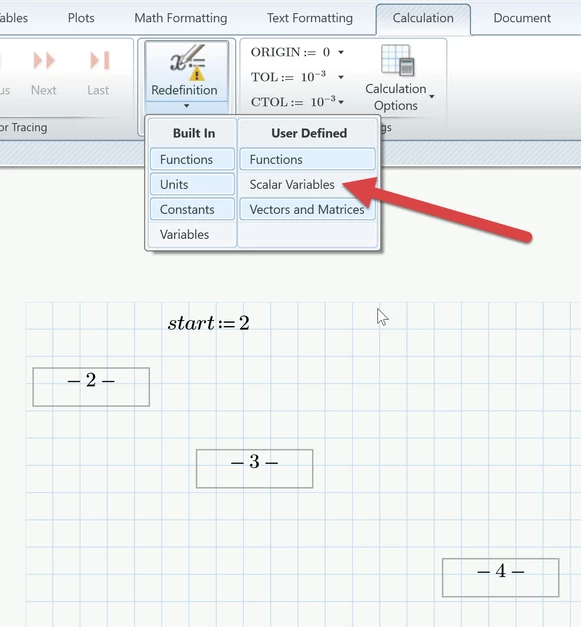
Turn off the redefinition warnings and the left hand side assignments will be hidden. Admittedly - a rather stupid program behavior that should be improved. The warnings should not overrule the hiding of the left hand side.


You may turn off the redefinition warnings as a whole or at least uncheck "User Defined - Scalar Variables".

Werner_E_0-1723582161278.png


2 replies

DJNewman
18-Opal
August 13, 2024

I can't replicate your issue of not being able to hide or collapse the left side. Here is what your worksheet looks like after opening it and changing nothing.


DJNewman_0-1723562566856.png


As for the header/footer, there are lots of things you can't put in there or can't do with things there; advanced controls are one of them.

PTC Marketer Creo and Mathcad. I run their YouTube channels, some Creo campaigns, and all Mathcad campaigns and communications.
25-Diamond I
August 13, 2024

@DJNewman wrote:

I can't replicate your issue of not being able to hide or collapse the left side.

Actually the left hand side still IS hidden and collapsed. But if you turn on the redefinition warnings for user-defined variables (I guess its turned off on your system as it is on mine), the assignment gets un-hidden to be able to display the green wavy line. Not necessarily desirable behavior, I guess.

I never paid attention to it but now I tested it and found, that those wavy line do not vanish when the document is printed or exported as XPS. This does not make much sense to me. The warming may be helpful while editing the worksheet in Prime, but not in a print-out.

Werner_E25-Diamond IAnswer
25-Diamond I
August 13, 2024

Turn off the redefinition warnings and the left hand side assignments will be hidden. Admittedly - a rather stupid program behavior that should be improved. The warnings should not overrule the hiding of the left hand side.


You may turn off the redefinition warnings as a whole or at least uncheck "User Defined - Scalar Variables".

Werner_E_0-1723582161278.png


Raiko17-PeridotAuthor
17-Peridot
August 14, 2024

If this isn't the very definition of "quick 'n dirty". Stupid software behavior indeed.

Thanks for your help

Raiko