16-Pearl
April 14, 2016
Solved

Unexpected imaginary numbers in symbolic solve

  • April 14, 2016
  • 2 replies
  • 4188 views

I was using Mathcad prime 3.1 to symbolically solve a pretty simple equation and I get imaginary numbers.  While I was easily able to just do it by hand, I'm curious as to why it did what it did and how to stop it, if possible.
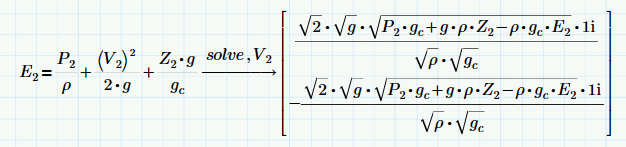
The solutions I've found posted here and elsewhere don't seem to help (i.e. using various assume commands)

File attached.

Thanks,
Best answer by Werner_E

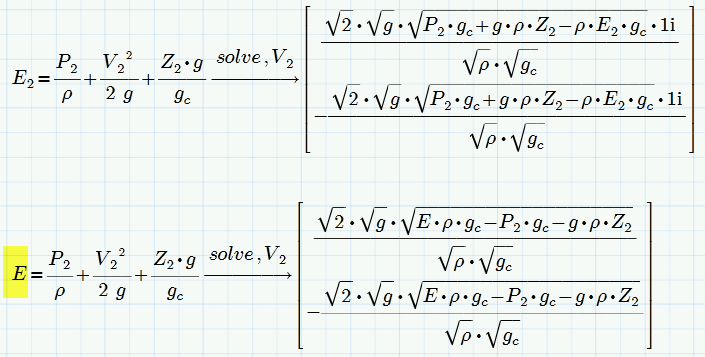
You probably know that Mathcads solution is perfectly correct - it sjust not presented the way we would call simplified. "Simplify" seems to be of no help here as Mathad/Prime/muPad has no preference for real results.

Playing around with that beast I found something curious - getting rid of the index in E makes Prime do what you want

It gets better!

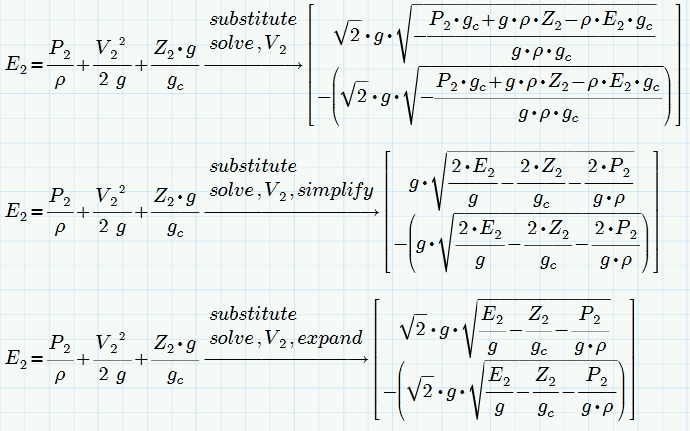
Next I was playing with substitute, "E2=E" before "solve" and "substitute, E=E2" after solve and it worked OK, but then I found that using "substitute" on its own does the job as well. Don't ask for an explanation for all those effects!

BTW, while I experience a very similar effect in Mathcad 15 ever so often as well, I have no problems with your specific equation in this version:

Regards

Werner

2 replies

23-Emerald I
April 14, 2016

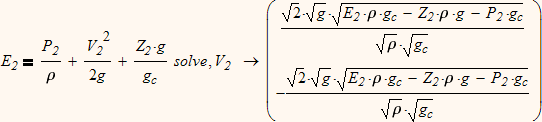
Maybe a bug?  Prime 3.0 gives

25-Diamond I
April 14, 2016

I am also using Prime 3.0.

As written below its the index which causes the problem.

No explanation!

EDIT: It seems not to be the index itself. It happens when the variable (E2) is not just a single letter.

Werner_E25-Diamond IAnswer
25-Diamond I
April 14, 2016

You probably know that Mathcads solution is perfectly correct - it sjust not presented the way we would call simplified. "Simplify" seems to be of no help here as Mathad/Prime/muPad has no preference for real results.

Playing around with that beast I found something curious - getting rid of the index in E makes Prime do what you want

It gets better!

Next I was playing with substitute, "E2=E" before "solve" and "substitute, E=E2" after solve and it worked OK, but then I found that using "substitute" on its own does the job as well. Don't ask for an explanation for all those effects!

BTW, while I experience a very similar effect in Mathcad 15 ever so often as well, I have no problems with your specific equation in this version:

Regards

Werner

DJF16-PearlAuthor
16-Pearl
April 14, 2016

Thank you.  While I don't seem to get the same effect by removing the subscript, the addition of substitute seems to do the trick.  Problem solved.

25-Diamond I
April 14, 2016

Douglas Ferry wrote:

Thank you.  While I don't seem to get the same effect by removing the subscript,

Maybe because I am using Prime 3.0 and not 3.1 ?