
1-Visitor
May 26, 2016
Solved

Vector: if any function and replacement function

  • May 26, 2016
  • 2 replies
  • 9600 views

The attached worksheet attempts to search a vector and if any values are "single" they are replaced with "group" and the value directly after it is multiplied by 2. In the attached worksheet (first attached jpeg) this doesn't work, however in a prior worksheet (second attached jpeg) it does work. Why is this?

Also, is there a function (such as an if function) that can search an entire vector for "group" and if it finds it anywhere then perform a line-by-line operation such as that above?
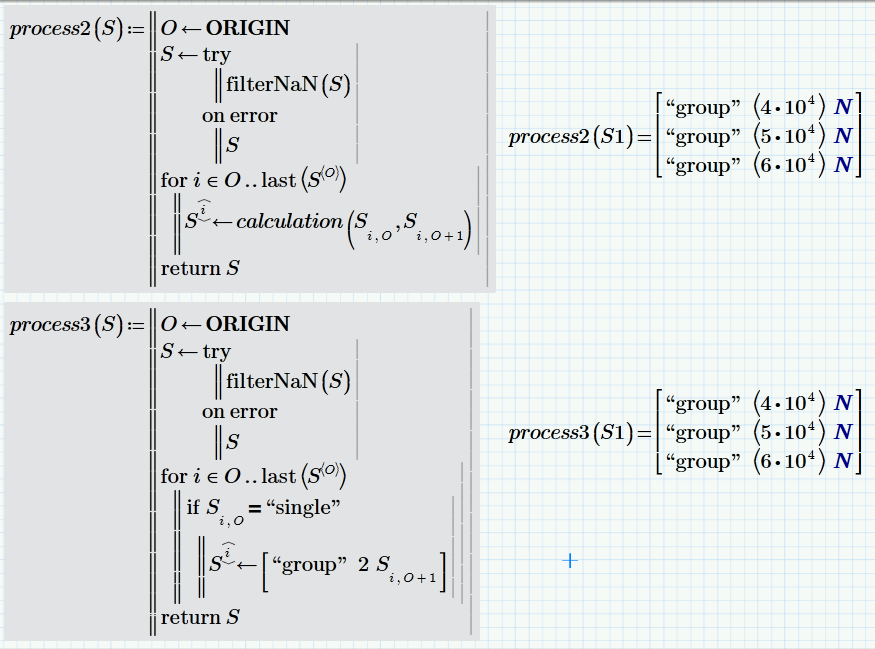
Best answer by Werner_E

Here is the modified version as explained above (filterNaN before calculations) and also a variant with integrated calculation.

If you want the first "single" or all entries before the first group be handled differently, you will have to specify your needs in more detail.

Regards Werner

2 replies

1-Visitor
May 26, 2016

What is ORIGIN in each worksheet?

I'd guess that ORIGIN=1 in the sheet that works, and ORIGIN=0 (default) in the sheet that doesn't.

dsochor1-VisitorAuthor
1-Visitor
May 26, 2016

Thank you Mark, I mistakenly thought ORIGIN = 1 by default.

Is there a way to search an entire function for "group" similar to the unsuccessful attached?

1-Visitor
May 26, 2016

I prefer to use the following in FOR loop declarations:

for i = ORIGIN ... last(Nn)

This will work regardless of what ORIGIN is set to, so you can copy/paste between worksheets with different ORIGIN values.

I cannot open your file because I don't have the latest version of Prime.

I think the program you used above for Nm is probably the best way to search a Matrix for a certain value.

25-Diamond I
May 26, 2016

I guess that using match or lookup can make things harder to read so I would stay with the for loop.

Maybe something like the following could be of value:

A similar approach would be possible if you insist on the one column vector data type.

Do you really need to see the type identifier in case the value is NaN as in your original approach?

Werner_E25-Diamond IAnswer
25-Diamond I
May 26, 2016

Here is the modified version as explained above (filterNaN before calculations) and also a variant with integrated calculation.

If you want the first "single" or all entries before the first group be handled differently, you will have to specify your needs in more detail.

Regards Werner

25-Diamond I
May 26, 2016

> Is your practice to highlight in grey any routine that is used repeatedly?

I am not really consequent doing so. The intention was to highlight functions which are used/called later in contrast to "static" calculation routines.

Usually I prefer using functions even when I call them just once in a sheet. Who knows, I might be tempted to extend the sheet one day or maybe I could reuse this function in another sheet 😉


WE