
1-Visitor
September 26, 2023
Solved

W/m^2 unit does not appear correctly even as base units
  • September 26, 2023
  • 3 replies
  • 2406 views

AC_10779194_0-1695755268591.png

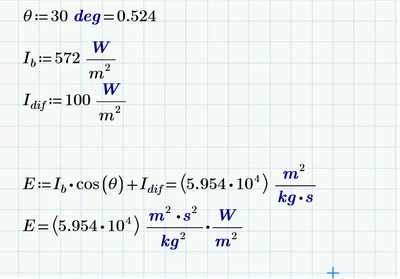
Where did I go wrong? Watt should be kg⋅m^2/s^

Thus Watt/m^2 should be kg/s^3

So the base unit reflected in the first line is already wrong (and the result off by x 100). I tried again by changing my custom unit in 2nd line and it confirms that the unit went awry somewhere

This is mathcad prime 8


Best answer by terryhendicott

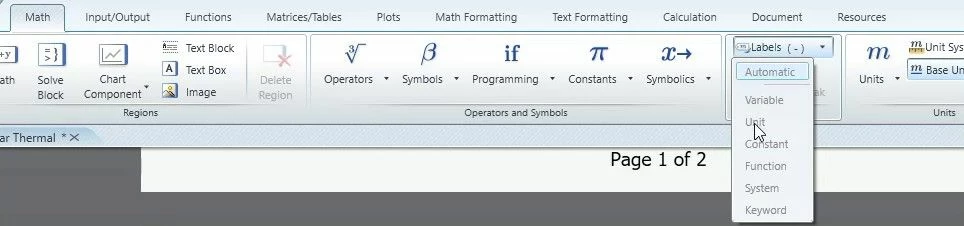
Hi Just realised you may not know how to change label.

Highlight the "m" then Math | Style | Label | Unit

Capture.JPG

3 replies

21-Topaz II
September 26, 2023

Hi,

In your graphic the 2nd and 3rd line "m" is not a unit label but a variable shown by the black font?

Change the label.

21-Topaz II
September 26, 2023

Hi Just realised you may not know how to change label.

Highlight the "m" then Math | Style | Label | Unit

Capture.JPG

18-Opal
September 27, 2023

ppal_0-1695774382516.png


21-Topaz II
September 27, 2023

Hi,

Capture.JPG

Capture2.JPG


1-Visitor
September 27, 2023

Thanks very much, solved. I should change my variables not to overlap and be more careful. Thanks for the inputs.

25-Diamond I
September 27, 2023

You have attached the wrong worksheet! The sheet you attached does not show the problem.

From the pic it looks to me that you had defined a variable with name m with m:=1 kg/s and obviously this variable is used instead of the desired unit meter. As Terry already wrote you can tell that not the unit meter is used by the color and style of the "m". If it would be taken as unit meter it would be blue and bold face.