10-Marble
June 27, 2025
Solved

Why is mathcad altering this vector when the IF conditions are not met?

  • June 27, 2025
  • 2 replies
  • 1377 views

I have a loop with two conditions in it, none of which are satisfied.

I created a variable 'a' and defined it as zero, and inside the loop, I made it change 'a' to 1 if the If conditions are satisfied. as shown in the figure below, a is still zero after the loop, meaning the conditions are not satisfied. However, the vector y4 is modified even though it only has equations to modify it inside the same conditions for variable 'a', which is unchanged:
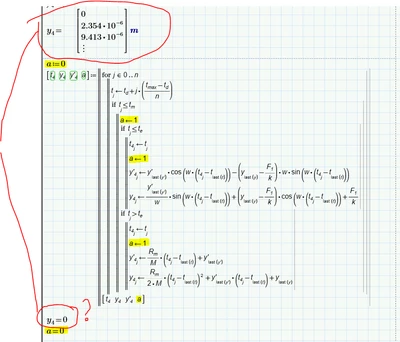
CN_13593194_0-1750999913102.png

what am I missing here?

I attached the file. Using Mathcad Prime 9.0.00

thanks
Best answer by terryhendicott

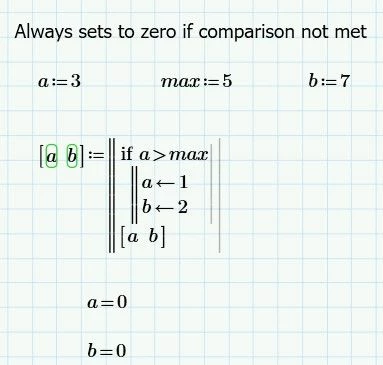
Lets keep to this simplification of your example:

Capture.JPG


what exactly is setting the variables to zero in your example?  good question

Prime has to make a distinction if "a" in the program is the global "a" defined above the program or a local "a" within the program.

"a" if passed into the program as a parameter then it is clearly a global one.

"a" if not defined on the left hand side of a assignment but is used on the right hand side of an assignment it is the global one.

In your arrangement "a" within the program is set as output to the "a" global one on completion of the program.  It is still not clear if it is "a" local or "a" global within the program.  You are assuming it is the global "a" and is thus defined in all cases.

Prime makes "a" within the program a local variable as it does not know any different and it has to make an assumption.  0 is the default value that is set to this "a" local variable as no condition sets it value to any other value.  So it returns "a" local as zero.


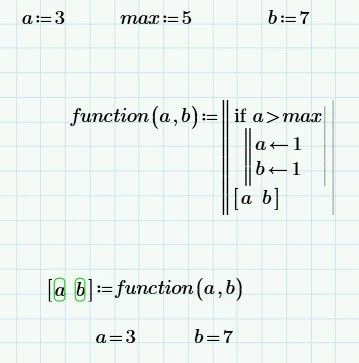
If you want it to be the global "a" do it like this

Capture2.JPG

Cheers

Terry

2 replies

23-Emerald IV
June 27, 2025

Note that both a and y4 are 0 after the loop.

What if you set a:=2 before the loop. Is it still 2 afterwards?


Success!

Luc

netoprax10-MarbleAuthor
10-Marble
June 27, 2025

good catch! I just tested the example where a changed (I changed my IF conditions) and noticed a changed


but as you pointed out, in this example, if I set a = 2, a becomes zero afterwards.


I still dont understand why is that, what's logic?


CN_13593194_0-1751028681018.png


21-Topaz II
June 27, 2025

tj never less than tm so nothing is done except set tj.

Capture.JPG

23-Emerald IV
June 27, 2025

"so nothing is done except set tj."


And that's the reason why the OP asks why y4 is changed...


Luc

25-Diamond I
June 27, 2025

Here is a work around without having to define a function:

Werner_E_0-1751034736140.png

The first line assigns the values of the global variables a and b (RHS of the assignment) to the local variables a and b (LHS of the assignment).

Variables used on the LHS of a local assignment in a program are ALWAYS considered local variables and do not affect global variables of the same name.

For variables used on the RHS Prime first looks if there is a local variable with this name and uses it. Only if no local variable with that name exists, Prime uses the global variable with this name.

When Prime scans the program before executing it it sees  the local(!) variables a and b used in the if condition and so it reserves space for them an assigns them the default value zero. It does not matter that the condition is not fulfilled when the program is executed and the local variables would not be used in that case.

You may think of the local variables as of variables with completely different names. So the effect you experience may become clearer that way:

Werner_E_1-1751035787219.png