1-Visitor
October 11, 2013
Solved

else and else if return incorrect answers!

  • October 11, 2013
  • 2 replies
  • 2437 views

Dear All,

I have found a fault in MP, (else and else if) is not working properly! Please see attached file.

I think they stop working properly, when there is (+ or -) in the equation.

Enjoy the discovery

Best answer by Werner_E

It's not an error in Prime but rather an error in using it.

In Mathcad, as in other programming languages, too, the result of boolean expressions are represented as numbers. 0 denotes FALSE and any other number would mean TRUE.

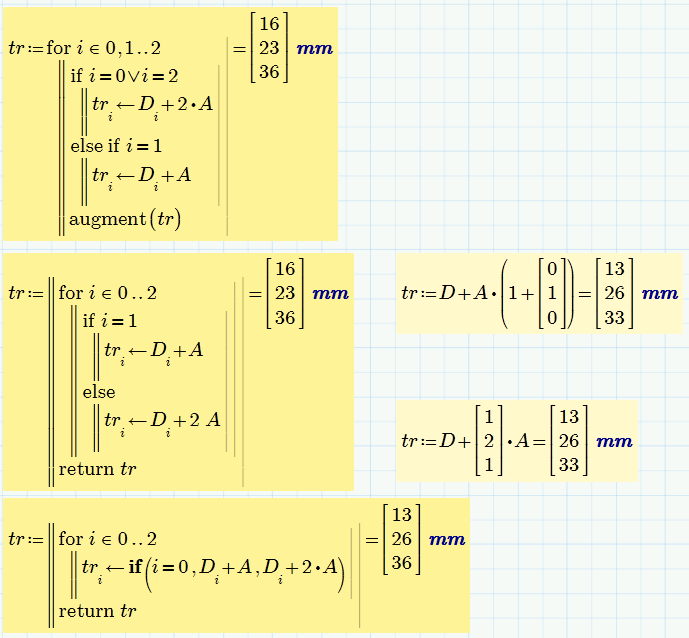
You write "if i=1 OR 2" which is equivalent to "if i=1 OR TRUE" . This condition is TRUE in every case (because the second part of the OR, the 2, is considered to be TRUE) and so the else if branch is never executed.

You would have to write "if i=1 OR i=2" to get what you want.

I don't see any reason for the augment function you use, simply using tr would do the same, even better if you place it after the for-loop and not inside.

See attached some ways to achieve what you want for the last example you posted.
if.png

2 replies

19-Tanzanite
October 11, 2013

My copy of Prime 2 won't open your document.

Alan

h_nas1-VisitorAuthor
1-Visitor
October 11, 2013

Hi,

Its in MP 3.0

19-Tanzanite
October 11, 2013

You'll need someone with MP3 to look at it then (you might consider renaming the file!).

Alan

Werner_E25-Diamond IAnswer
25-Diamond I
October 11, 2013

It's not an error in Prime but rather an error in using it.

In Mathcad, as in other programming languages, too, the result of boolean expressions are represented as numbers. 0 denotes FALSE and any other number would mean TRUE.

You write "if i=1 OR 2" which is equivalent to "if i=1 OR TRUE" . This condition is TRUE in every case (because the second part of the OR, the 2, is considered to be TRUE) and so the else if branch is never executed.

You would have to write "if i=1 OR i=2" to get what you want.

I don't see any reason for the augment function you use, simply using tr would do the same, even better if you place it after the for-loop and not inside.

See attached some ways to achieve what you want for the last example you posted.

if.png