21-Topaz II
July 9, 2025
Solved

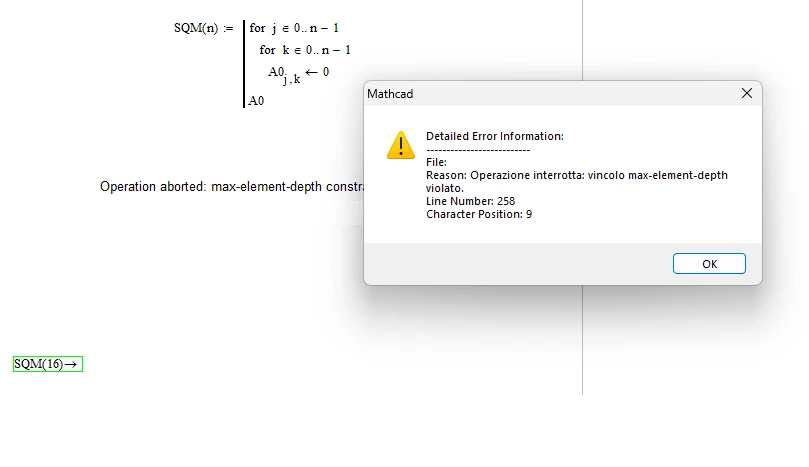
never seen an error like this

  • July 9, 2025
  • 2 replies
  • 1458 views

Good morning everyone!
I've been using Mathcad (now M15) for decades, but I've never seen an error like this. Could it be because I only have 4GB of RAM? I'm really not sure what to do. Thanks to anyone who can give me some good advice.
Regards.


error.png

Best answer by Werner_E

So, does the error also occurs when you are just using SQM3 and/or SQM4?

Does it also occur when you use numeric evaluation?


I see that you are using M040 which, according to the Readme of M050 suffers from the "issue with Mathcad 15.0 M040 in handling matrices with 256 or more elements"

There is no more information about this bug and so we can't say if its an issue which occurs from time to time in specific situations or if its something which is reproducible.

I also can't say if your installation of Mathcad got broken somehow and a reinstallation would help or if its a bug immanent to M040.

I attach the Readme of M050 so you can see which bugs were fixed since M040  (there were releases M045 and M050).
If you think its worth the trouble you may try to find the installation files for M050 somewhere on the net and upgrade your installation. The license for M040 should be valid for M050 as well. Of course you have to take care to save the license file!


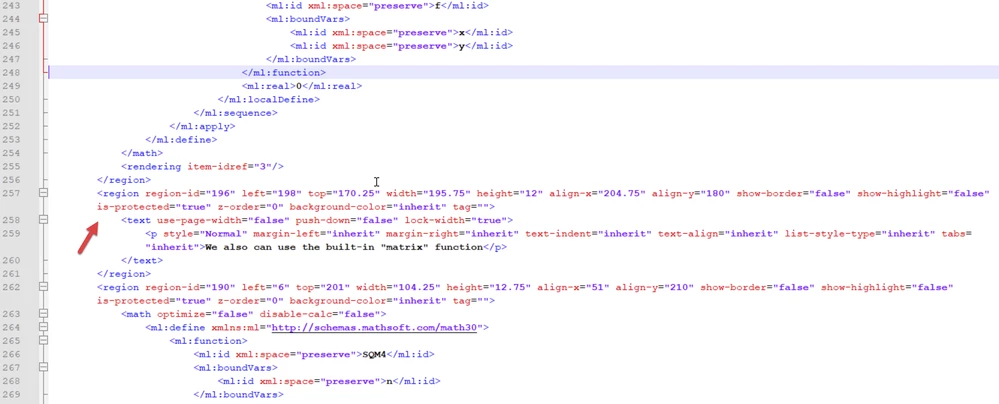
BTW, the screenshot which shows the same error using my sheet - were you using my sheet unchanged? According to the error message the error occurs in line 258, position 9, which, if I am not wrong, is just after the definition (not evaluation) of SQM3.
No idea what would cause an error at this position.

Werner_E_2-1752069496483.png


2 replies

21-Topaz II
July 9, 2025

Hi,

Try this file that does it OK.  A0 matrix is only sixteen by sixteen that can easily be accommodated in 4GB.

Advantage can be taken of Mathcad's default actions.

a) Define last element in a matrix sets aside memory for whole matrix.

b) Defining memory sets 0.0 by default in each element.


I do not know why the presentation of the matrix is different. 

Capture.JPG

Cheers

Terry

-MFra-21-Topaz IIAuthor
21-Topaz II
July 9, 2025

Hi!

I opened your file, but it gives me the same error (I don't think it's a virus, Norton says everything's fine), so what's the problem?
Defective computer?

25-Diamond I
July 9, 2025

Similar to Terry I also could not duplicate the error you experience.

My machine has more RAM than yours but I can't image that low RAM can be the cause of the problem given that the 16x16 matrix generated is really tiny and Mathcad won't take advantage of more RAM anyway.

You sure should have attached the sheet you created so we could test it - maybe its broken in some respect.

Here are some ways to create the zero-matrix and all seem to work OK in MC15 with symbolic evaluation on my side. File is attached.

Werner_E_2-1752057509488.png


EDIT: Just read that you experienced the same problem with Terry's file. So I assume that you will also have no success using mine.

Would be interesting if all my four functions would fail with the same error message.

My best guess is that something with your installation of Mathcad and its symbolics got broken. You may try reinstalling Mathcad. Don't forget to save your license file before you do so as I suspect that you won't be able to create a new one given that PTC has ceased support.


-MFra-21-Topaz IIAuthor
21-Topaz II
July 9, 2025

It gives me the same error:

error W.png

21-Topaz II
July 9, 2025

Hi,

A couple of things I would try.


Try changing the arrow after SQM1(16) etc to an equal sign so you are using  the numeric not symbolic engine?  That's the difference in presentation on my sheet.

Try deleting the program SQM1(n) and SQM1(16)= leave the other three?  Then delete SQM2(n) if that does not work etc.


Can you include your worksheet so we can turn it into the underlying html and investigate line number 258 position 9?


Cheers

Terry