
1-Visitor
May 4, 2013
Solved

problem with tables

  • May 4, 2013
  • 1 reply
  • 4482 views

Hello!

I would like to ask you how to cope with a table that needs description, by that i mean f.ex. row's name. Below I attached a screenshot from Excel. Is it possible to do sth like that in MathCad? Moreover I would like to oparate later on rows, f.ex. new row which is the result of substraction of 2 predecessors.It should be presented in a clear form (technical report) I am beginner with that programme and have no idea how to do it. And is it possible to somehow fill in table descrption ranges of load (like in the first row below)? Thank you all for help and advices.

Bez%C2%A0tytu%C5%82u.png

Best answer by Werner_E

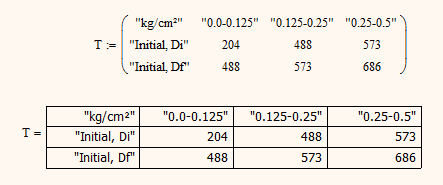
Cells of matrices can be text strings, too (in Mathcad text is to be enclose in "-signs)

You can then use the result format menu to present the matrix as table.

Be be aware it will never be that pretty looking as you can make an Excel table look.

Tables1.png

1 reply

Werner_E25-Diamond IAnswer
25-Diamond I
May 4, 2013

Cells of matrices can be text strings, too (in Mathcad text is to be enclose in "-signs)

You can then use the result format menu to present the matrix as table.

Be be aware it will never be that pretty looking as you can make an Excel table look.

Tables1.png

jsznajder1-VisitorAuthor
1-Visitor
May 4, 2013

My whole formatting tab is frozen when I mark my matrix, so I have no possibility to edit its form. It works everywhere in the worksheet but not in matrices =/ Thank You for reply, that looks decently

25-Diamond I
May 4, 2013

I just remember that you use Prime2, not Mathcad15. In Prime you don't have different views (matrix/table) for matrices.

On the other side new in Prime is the option to "Insert table". This is a table with header lines for names and units. Unfortunately this sort of table is only meant for manual input and cannot be created by a program.

You format matrices via "Matrices/Tables" tab