
1-Visitor
October 14, 2019
Solved

The default status configuration error from PhysicalAssetThingTemplate

  • October 14, 2019
  • 3 replies
  • 3761 views

Hello,


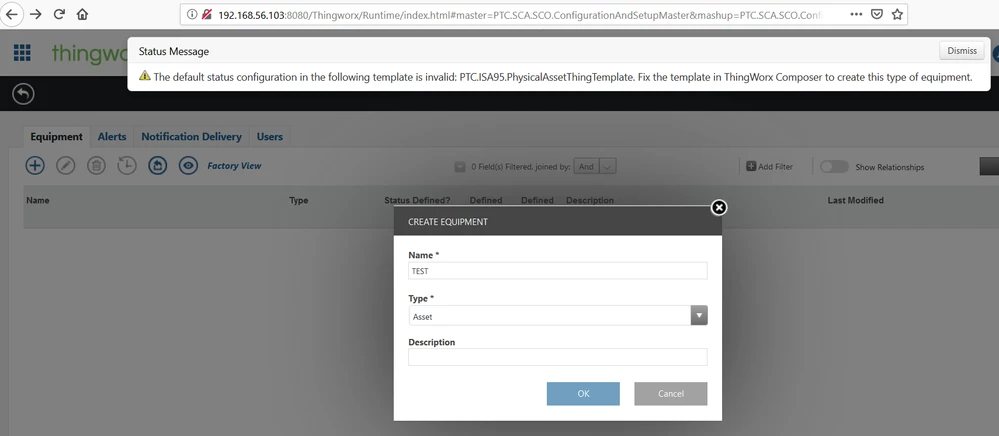
As shown in attached image, I am trying to add an asset in the Asset advisor Configuration page. But I am getting the error as shown in the pic. I tried editing the PhysicalAssetThingTemplate template but it is not editable as it is from the extension. Am I missing out something here?

But I have no problem in doing the same in older version of Thingworx.

Current Version: 8.5.0-b12.


Thanks in advance.Error Message.png
Best answer by vinesh

SOLUTION:


I had missed out the "Post Import Database Configurations" steps as given in the https://support.ptc.com/help/thingworx_apps/r8.5/en/#page/thingworx_apps%2FThingWorxAppsSetupConfig%2Fimporting_the_thingworx_apps_extension.html%23.


Upon performing those steps, there was no such warnings,

3 replies

5-Regular Member
October 14, 2019

Hi,

Go to Thingworx Composer and run the service CreateTables for the thing PTC.SCA.SCO.DatabaseManager. After execution of this service, try the equipment page again.


Thanks,

Himesh Rajpal

vinesh1-VisitorAuthor
1-Visitor
October 14, 2019

Thanks for the quick reply. I tried doing what you said but got error. here is the scrip log details:

1. Error in: PTC.SCA.SCO.DefaultStatusManager.ReloadStatusDefinitions javascript service 

2. com.thingworx.dsl.exceptions.DSLRequestProcessingException: Execution error in service script [ValidateDefaultStatusExpressionsByTemplate] :: An error has occurred. Contact your administrator for further details. 


Everything works fine till 8.4 update. The problem is only in 8.5.


vinesh1-VisitorAuthor
1-Visitor
October 14, 2019

Also to mention, I have carefully added the relavent extension package for 8.5. I have followed the instructions as given by PTC to import the Thingworx Manufacturing apps extension package.

vinesh1-VisitorAuthor
1-Visitor
October 15, 2019

Looks like there have been some buggy changes made in the 8.5 version of Manufacturing apps extension. As a workaround, I imported the 8.4 version of Manufacturing apps extension to 8.5 version Thingworx and it worked without any issue. I hope I won't face any problems later.

Community Manager
October 24, 2019

Hi @vinesh.


Just want to make you aware that running ThingWorx Manufacturing Apps 8.4 on ThingWorx 8.5 is not a supported configuration and it is expected that you will experience problems.


Regards.


--Sharon

vinesh1-VisitorAuthorAnswer
1-Visitor
October 30, 2019

SOLUTION:


I had missed out the "Post Import Database Configurations" steps as given in the https://support.ptc.com/help/thingworx_apps/r8.5/en/#page/thingworx_apps%2FThingWorxAppsSetupConfig%2Fimporting_the_thingworx_apps_extension.html%23.


Upon performing those steps, there was no such warnings,