
1-Visitor
March 29, 2025
Solved

Creo Elements direct Modeling Express export DXF???

  • March 29, 2025
  • 1 reply
  • 1457 views

Hello, I am using the free Creo Elements direct Modelling express program and would like to save my 2D drawing in annotation as DXF. Unfortunately, I do not understand on your help page in which file I should change something so that I can save a dxf file. Can you offer me further assistance? Many thanks in advance and best regards Daniel
Best answer by Kotom-Eng

I forgot to tell to uncompress am_2d_0.mi as well. You will get a text file without extension am_2d_0. This is this text file that you should use with dxfdwg.


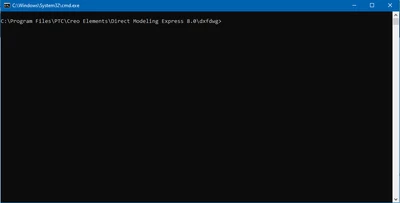
You should open a command terminal in the directory C:\Program Files\PTC\Creo Elements\Direct Modeling Express 8.0\dxfdwg\

KotomEng_0-1743427294253.png

and type in for example:

dxfdwg -o -f  C:\temp\am_2d_0 C:\temp\am_2d_0.dxf C:\temp\am_2d_0.log


1 reply

16-Pearl
March 31, 2025

Hello,

You cannot save directly to DXF from Modeling Express. But there is a workaround:

- Save in a bundle bd2.

- Unzip the bundle bd2 file. You will get a file name am_2d_0.mi

- Use the executable dxfdwg.exe located in C:\Program Files\PTC\Creo Elements\Direct Modeling Express 8.0\dxfdwg


1-Visitor
March 31, 2025

Thank you for the good news,

but I get a file that is not packed. Can you explain exactly what you mean by ‘Unzip the bundle bd2 file. You will get a file name am_2d_0.mi’.

Best regards Daniel

der_Wolfgang
13-Aquamarine
November 1, 2025

There is a much more easier way available since November 2023.  I recommend to watch out for news in the German CAD.DE forum as well. 

Have a look here https://ww3.cad.de/foren/ubb/Forum29/HTML/004939.shtml  and use the online translator you trust!

You can see Annotation as a kind of remote controlled ME10. Therefore Annotation can execute every ME10 command as well . 

So we simple call 

STORE <modus> SELECT '<partid>' CONFIRM DEL_OLD '<filename>' END

where <modus> in your use case is DXF. This command is send using a CEDM Integration Kit Function. 

In the post I pointed to is a lisp file mentioned you need to load when Annotation is loaded. Then there are 2 new entries in the file menu (opened with CTRL-S as usual). for DXF: Choose "Save 2D in general" as file type.

The user interface is available in English as well:  so don't worry too much about the German written thread.

am_store_generic_001_EN.png
For every of the SEVEN different types of drawing objects you can export them to FIVE different file formats.  This includes storing your drawing directly as DXF file.   No fiddling in the file system, no extracting of a BD2 file, no extra call of a translator needed at all.  Enjoy!

cad.de + osd.cad.de