1-Visitor
January 6, 2014
Solved

Change constraints?

  • January 6, 2014
  • 1 reply
  • 2700 views

After a piece is constrained and the green checkmark has been checked, is there a way to change that?

Jill Mobley

Team 5896

    Best answer by sm_01

    Jill,

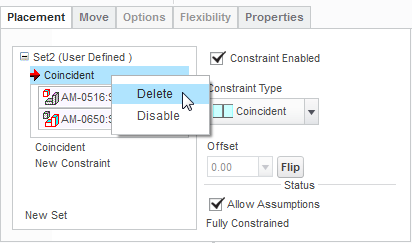
    If you chose "Edit Definition" from the model tree or RMB for the given component, you can activate the "Placement" tab in the ribbon to show all the constraints and their status. You can update or remove individual constraints or the whole constraint set.
    placement.png

    1 reply

    sm_011-VisitorAnswer
    1-Visitor
    January 6, 2014

    Jill,

    If you chose "Edit Definition" from the model tree or RMB for the given component, you can activate the "Placement" tab in the ribbon to show all the constraints and their status. You can update or remove individual constraints or the whole constraint set.

    placement.png

    1-Visitor
    January 6, 2014

    Thank you Scott. I am sure I will have many more noob questions.

    Jill

    1-Visitor
    January 6, 2014

    No problem. Be sure to check out some of the Robotalk webcast videos on the Video tab. We recorded all the sessions this year and the first 3 are all about Creo basics. Don't hesitate to ask questions though. No such thing as a bad question.