
1-Visitor
August 29, 2016
Solved

Creo 3.0 Student Edition: Cable Wiring

  • August 29, 2016
  • 1 reply
  • 3749 views

Hi guys,

I need urgent help with Creo 3.0 Student Edition. I am a student at Friedrich-Alexander University Erlangen-Nuremnberg in Germany and downloaded, installed and registered correctly the software so far. For my master thesis I need to make a 3D-draft oft two cable harnesses. According to your website Creo 3.0 should be able to do that.

But after I have started the programm, I can only choose a new draft type of (volume corpus, sheet and mass element). Cable harnesses are written in grey (please see attachment), so I can t select it.

What can I do to choose that type? I ve downloaded the correct license from my university, there was only one. And that was automatically created during installation/registration.

Please help

Thanks

Best regards

Tom
    Best answer by MartinHanak

    Hi,

    I have practically no knowledge concerning HARNESS functionality, but I can provide you some information ...

    1.]

    launch Creo and then click File > Help > System Information. Scroll INFORMATION WINDOW to see Configured Option Modules section and look for HARNESS options inside the list of modules. I guess that you will not find it ... this means that your license has limited functionality concerning HARNESS functionality. Maybe the limitation is related to harness drawings, I do not know exactly.

    2.]

    Read following help pages:

    http://help.ptc.com/creo_hc/creo30_pma_hc/usascii/#page/pma/electrical_design/About_Creating_Harnesses.html

    http://help.ptc.com/creo_hc/creo30_pma_hc/usascii/#page/pma/electrical_design/To_Create_a_Harness.html

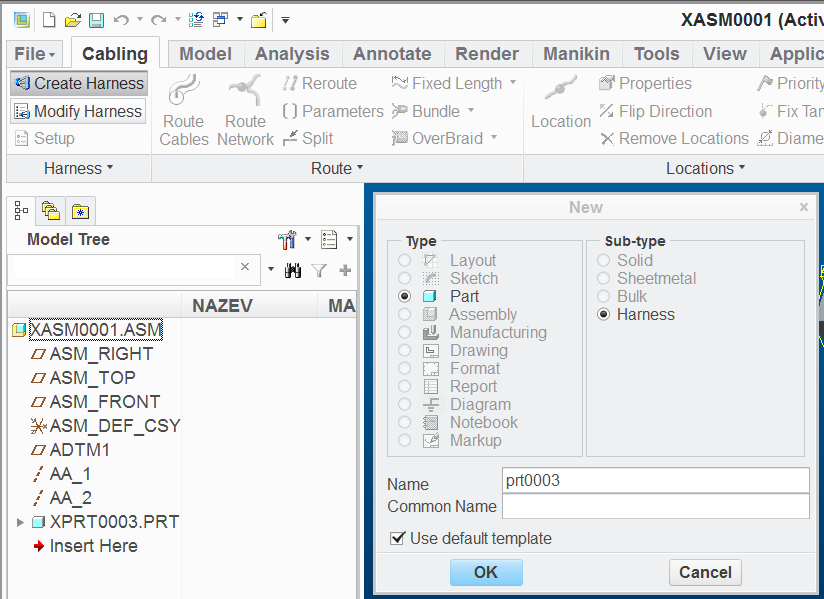
    To be able to create harness part, you have to:

    • open/create assembly
    • activate Applications tab
    • select Cabling button
    • click Create Harness button
    • do what you need ...

    harnesspart.png

    MH

    1 reply

    24-Ruby III
    August 30, 2016

    Hi,

    Student license does not contain Harness module. You need to ask your university CAD administrator for Academic license.

    MH

    1-Visitor
    August 30, 2016

    Hi,

    Thanks for your fast answer. According to that picture (attachment) the Student Edition should include the Harness Module...

    Or is it a wrong info?

    Best regards

    Tom

    24-Ruby III
    August 31, 2016

    Hi,

    I have practically no knowledge concerning HARNESS functionality, but I can provide you some information ...

    1.]

    launch Creo and then click File > Help > System Information. Scroll INFORMATION WINDOW to see Configured Option Modules section and look for HARNESS options inside the list of modules. I guess that you will not find it ... this means that your license has limited functionality concerning HARNESS functionality. Maybe the limitation is related to harness drawings, I do not know exactly.

    2.]

    Read following help pages:

    http://help.ptc.com/creo_hc/creo30_pma_hc/usascii/#page/pma/electrical_design/About_Creating_Harnesses.html

    http://help.ptc.com/creo_hc/creo30_pma_hc/usascii/#page/pma/electrical_design/To_Create_a_Harness.html

    To be able to create harness part, you have to:

    • open/create assembly
    • activate Applications tab
    • select Cabling button
    • click Create Harness button
    • do what you need ...

    harnesspart.png

    MH