1-Visitor
July 27, 2020
Question

Creo 6.0.2.0 license issue. No previous version installed.

  • July 27, 2020
  • 1 reply
  • 6085 views

I installed Creo 6.0.2.0.  I keep getting this error message and shuts off when I click OK.  There was never an older version of Creo installed in this computer.


Thanks
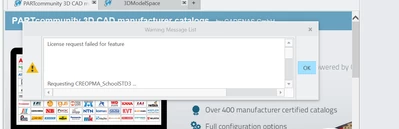


gonzocl_0-1595860106153.png


1 reply

24-Ruby III
July 28, 2020

@gonzocl wrote:

I installed Creo 6.0.2.0.  I keep getting this error message and shuts off when I click OK.  There was never an older version of Creo installed in this computer.


Thanks



gonzocl_0-1595860106153.png


Hi,

did you follow procedure described in https://apps.ptc.com/schools/references/install_creo6_schools_standard.pdf -OR- https://apps.ptc.com/schools/references/install_creo6_unistudent_standard.pdf ?


What Product code did you enter during installation ?

1-Visitor
August 8, 2020

I am also following this as have same problem, followed the pages to the letter but the licence I was sent says creo parametric 5.0 how do I get version 6.0? 

24-Ruby III
August 10, 2020

@Garyawallace wrote:

I am also following this as have same problem, followed the pages to the letter but the licence I was sent says creo parametric 5.0 how do I get version 6.0? 


Hi,

I am sorry I do not have any "magical" advice.

During Creo installation you have to follow 2 basic rules:

  • hidden directory C:\ProgramData\PTC\Licensing must be empty
  • one of following Product codes must be used

               K-12 students can use Product code BE600908EDSTUDENTEDK12
               University students can use Product code BK600908EDSTUDENTEDUNI