
1-Visitor
March 1, 2021
Solved

Creo 7.0 License Troubles

  • March 1, 2021
  • 3 replies
  • 5535 views

After looking at many questions and solutions posted here, I finally give up.


The license I requested does not seem to work properly with my Creo version.Screenshot 2021-03-01 130000.png I have tried the key I am supposed to use, two others from the forum, the license files from my email are also added.
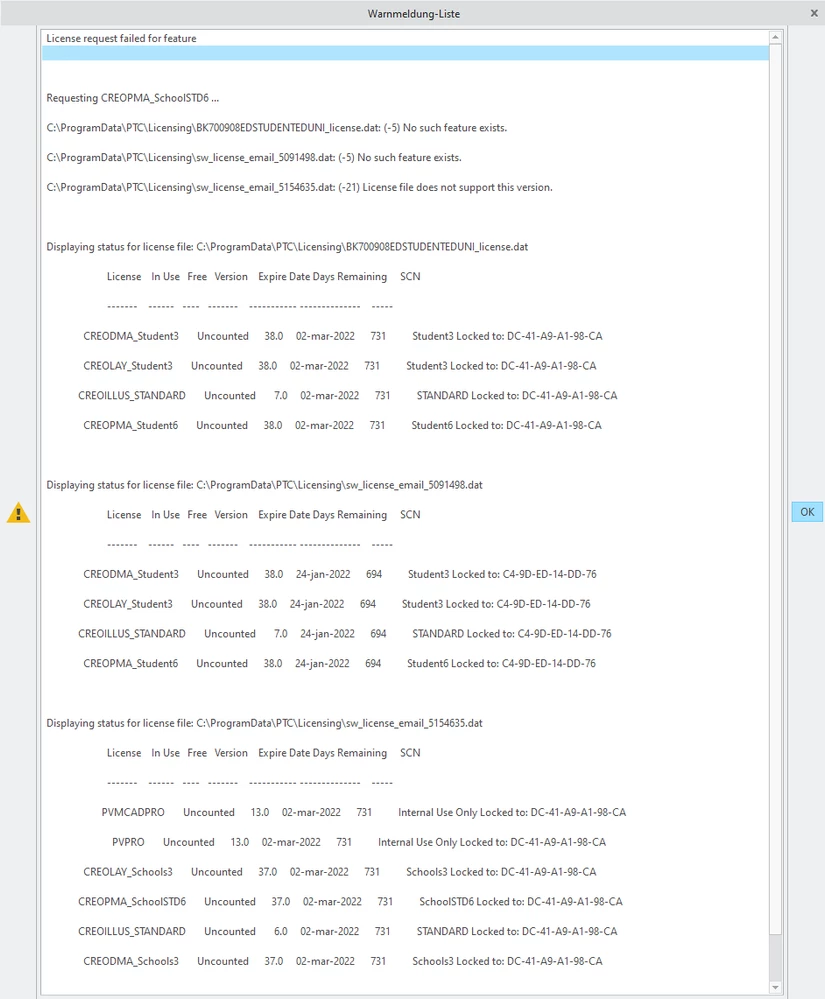
 

What else can I do?


This is the second machine I am trying this install. On the other it worked fine - is there a way to port the license in case it is restricted to one machine?


Thanks in advance,

Moritz

Best answer by MartinHanak

@MB_9792676 wrote:

Hi,


I have attached the ip.txt below.


Hi,


C:\ProgramData\PTC\Licensing\sw_license_email_5091498.dat

  • license is generated for different computer
  • you cannot use this license file


C:\ProgramData\PTC\Licensing\sw_license_email_5154635.dat

  • license is generated for your computer
  • license contains Creo Parametric 6.0 license (CREOPMA_SchoolSTD6, version 37.0)
  • you cannot use this license file

C:\ProgramData\PTC\Licensing\BK700908EDSTUDENTEDUNI_license.dat

  • license is generated for your computer
  • license contains Creo Parametric 7.0 license (CREOPMA_Student6, version 38.0)
  • you CAN use this license file


1.] open parametric.psf file in Notepad (it is located in Parametic\bin subdirectory in Creo installation)

2.] check/modify two following lines

ENV=PTC_D_LICENSE_FILE-=C:\ProgramData\PTC\Licensing\BK700908EDSTUDENTEDUNI_license.dat

ENV=CREOPMA_FEATURE_NAME=CREOPMA_Student6 ()

3.] run Creo


3 replies

1-Visitor
March 1, 2021

I'm having the same problem with that same code.

24-Ruby III
March 1, 2021

@MB_9792676 wrote:

After looking at many questions and solutions posted here, I finally give up.


The license I requested does not seem to work properly with my Creo version.Screenshot 2021-03-01 130000.png I have tried the key I am supposed to use, two others from the forum, the license files from my email are also added.


What else can I do?


This is the second machine I am trying this install. On the other it worked fine - is there a way to port the license in case it is restricted to one machine?


Thanks in advance,

Moritz


Hi,

please run following command in Command prompt window on problematic computer and upload ip.txt file.

ipconfig /all > ip.txt


1-Visitor
March 2, 2021

Hi,


I have attached the ip.txt below.

24-Ruby III
March 2, 2021

@MB_9792676 wrote:

Hi,


I have attached the ip.txt below.


Hi,


C:\ProgramData\PTC\Licensing\sw_license_email_5091498.dat

  • license is generated for different computer
  • you cannot use this license file


C:\ProgramData\PTC\Licensing\sw_license_email_5154635.dat

  • license is generated for your computer
  • license contains Creo Parametric 6.0 license (CREOPMA_SchoolSTD6, version 37.0)
  • you cannot use this license file

C:\ProgramData\PTC\Licensing\BK700908EDSTUDENTEDUNI_license.dat

  • license is generated for your computer
  • license contains Creo Parametric 7.0 license (CREOPMA_Student6, version 38.0)
  • you CAN use this license file


1.] open parametric.psf file in Notepad (it is located in Parametic\bin subdirectory in Creo installation)

2.] check/modify two following lines

ENV=PTC_D_LICENSE_FILE-=C:\ProgramData\PTC\Licensing\BK700908EDSTUDENTEDUNI_license.dat

ENV=CREOPMA_FEATURE_NAME=CREOPMA_Student6 ()

3.] run Creo


1-Visitor
March 5, 2021

Hello, I have the same problem, when I open creo I read the same message that I attach. 

I've read and tried the solution that you suggest but I don't know what is the file named ip.txt. 

Could you help me? 

Thanks

problema creo.JPG

24-Ruby III
March 5, 2021

@GD_9838213 wrote:

Hello, I have the same problem, when I open creo I read the same message that I attach. 

I've read and tried the solution that you suggest but I don't know what is the file named ip.txt. 

Could you help me? 

Thanks

problema creo.JPG


Hi,

license file mentioned on the picture contains Creo 6.0 license. Unfortunatelly you are using it to launch Creo 7.0.