
1-Visitor
February 7, 2016
Solved

Intelligent Fasteners and Windchill

  • February 7, 2016
  • 2 replies
  • 3117 views

We've been using the Intelligent Fastener (mainly screws) for a while now and love it!  No more guessing where holes need to be drilled once we place parts in an assembly.  However, we've run into an issue with integrating this feature into Windchill and need some help.

When you create a fastener, Creo appears to pull a part family our of its standard library set and this now appears in your workspace.  Not an issue at first as Creo and Windchill will happily import these parts into your model and store them in Windchill.

However, we just created a new assembly (not using our existing robot), and when we tried to check it in, we could not.  All of the fasteners "already exist in Windchill" so we cannot upload them.  We tried updating the part with what's on Windchill using the workspace buttons, but to no avail.  Short of eliminating the fasteners or trying to replace them with the Windchill versions manually, is there a way to resolve this?  Can we make the Intelligent Fastener look to our own Windchill server for parts first and/or tell it not to upload those to Windchill since they are "built-in" parts?

Rande Johnson

Coach/Mentor FRC4931, FTC 8620/9998
    Best answer by sm_01

    Rande,

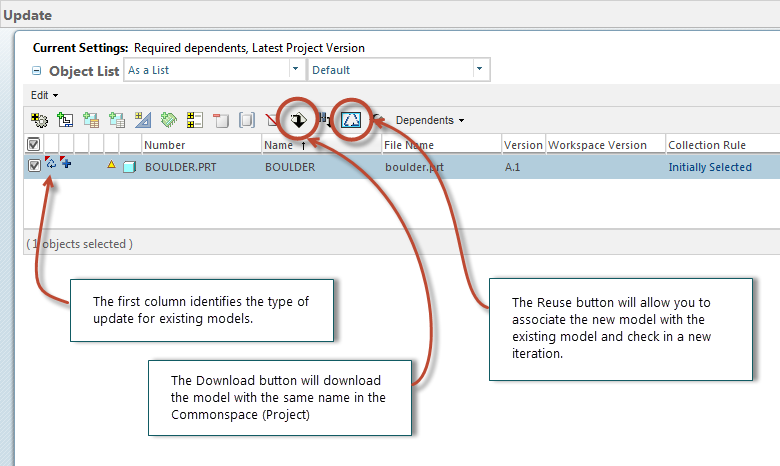
    Glad to hear you team is using Windchill for CAD data management. Update will work here. Select the items in question and pick Update from the file menu. If you want to update the existing models with the Commonspace (Project) models, set the Update action to Download. This will download the same models from the Commonspace (Project) and update them in your session of Creo.

    There is a good description of this process in the Help Center under the topic named Updating Out-of-Date Objects.

    update_existsing.png

    2 replies

    sm_011-VisitorAnswer
    1-Visitor
    February 8, 2016

    Rande,

    Glad to hear you team is using Windchill for CAD data management. Update will work here. Select the items in question and pick Update from the file menu. If you want to update the existing models with the Commonspace (Project) models, set the Update action to Download. This will download the same models from the Commonspace (Project) and update them in your session of Creo.

    There is a good description of this process in the Help Center under the topic named Updating Out-of-Date Objects.

    update_existsing.png

    1-Visitor
    February 8, 2016

    If anyone else is using IFX and Windchill for CAD Data Management, you might want to take a peek at this video.

    Tutorial: Loading PTC Creo Intelligent Fastener Library into Windchill

    It would be a lot nicer if these items were available in Windchill already, so I will continue to work on that.

    It will have to be post build-season. I just cannot find the time right now...

    1-Visitor
    February 9, 2016

    Haven't looked at the video yet, but getting the following error when I try to update: "Documents in the list cannot be added to workspace as on-the-fly sharing is disallowed and they are not already shared.". 

    1-Visitor
    February 9, 2016

    Hmm, you got me on that one. That message is related to sharing files between PDMLink and ProjectLink and should not be appearing since no of us have access to PDMLink. How did you invoke the Update action? Model Tree in Creo, File menu in Workspace, right mouse button in workspace, one item, multiple items?