1-Visitor
February 22, 2021
Solved

Mathcad won't download/run on my PC

  • February 22, 2021
  • 1 reply
  • 4712 views
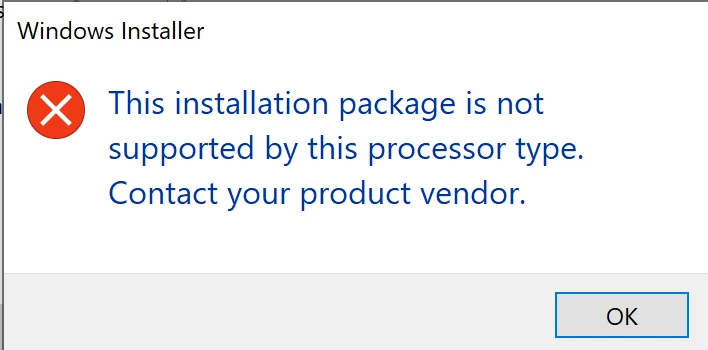
I am unable to download the Mathcad software I purchased onto my windows 10 computer. It gives me an error saying it cannot run on my PC which has a 64 bit operating system.

Best answer by MartinHanak

@LB_9826607 wrote:

Hi Martin,

Originally, I had just clicked on the download button from my order confirmation email and then tried again to access my download from in the PTC Webstore. In using the link you provided, I still had no success in getting the software to install. However, I was at least met with an error I believe I can interpret. The problem seems to be my computer processor. I guess I need to take my PC to some hacker person to jailbreak it.

 error message 3.png


Hi,

you need PC with 64-bit Intel/AMD processor and Windows 7/10 64-bit.

1 reply

17-Peridot
February 23, 2021

@LB_9826607,


Which version of Mathcad you use? What is the exact error you receive? Please share snapshot of error.

Note:

  1. Mathcad 15.0 M050 is supported on Windows 10 OS
  2. Mathcad Prime 4.0 until 6.0 are supported on Windows 10 OS
1-Visitor
February 23, 2021

I purchased Mathcad Prime 6.0 Student Edition, and when I click download on the .exe file these two error messages pop up. 

error message 1.pngerror message 2.png

17-Peridot
February 23, 2021

@LB_9826607,


Based on your shared snapshot and my assumptions, suggesting below points:

  1. Did you unzipped downloaded files before running *.exe? (if download is in compressed state)
  2. If you have unzipped downloads then, try running *.exe as Administrator (Right Mouse Click on exe > Run as Administrator)
  3. If downloaded files are corrupted, refer https://www.remosoftware.com/how-to-repair-corrupted-7zip-files to repair it and see if it helps (I googled for information)