1-Visitor
July 8, 2015
Solved

Not letting me export as stl.

  • July 8, 2015
  • 2 replies
  • 14608 views

Hi Foks

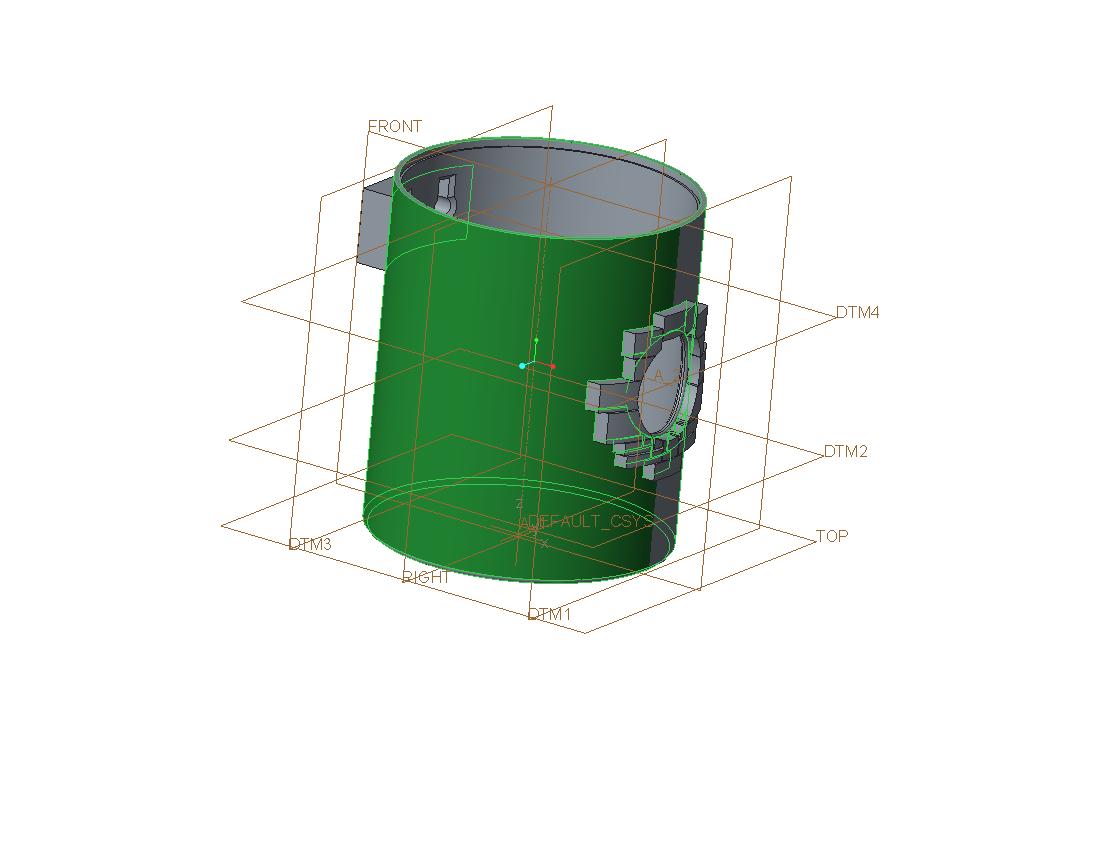
when trying to export this design as stl. its coming up 'Unable to triangulate highlighted surfsce. Aborting output'
prt0006.jpg

now this part has just been extruded and shelled, so what am I doing wrong?

any help appreciated

Jeremy

    Best answer by tbrotherhood

    Extrude 3 is causing the problem, investigating...

    The sketch for extrude 3 was the problem.  I found this by moving the Insert Here flag up to below the first feature, regenerating and trying to create an STL repeat for each feature until the STL creation failed.  Extrude 3 was the culprit.  I tried altering the way the extrude was created, no luck.  I moved the datum away from the model to simplify the extrude to a single direction up to the outer surface but still no joy. Next stop was the sketch.  I moved some of the shapes apart in case the gaps were too small for the triangles, still no joy.  I then noticed the inner arcs on each shape were very close and in some cases touching the round on the large hole. Drawing a slightly larger circle and trimming all the shapes back to it sorted the problem.

    Phew!  Now to bed....zzzzzzzzzzzzzzzzzzzzzzzzzzzzzzzzzzzzzzz

    2 replies

    12-Amethyst
    July 8, 2015

    Jeremy,

    The usual cause is a model made up of surfaces i.e. no solid material.

    Another cause is ambiguous geometry.  I created a mobius strip as one part and it refused to save STL probably because it is a single surface shape.  I split it into two and both parts saved OK as STL files.

    Tim

    Just a thought, did you set the facet size to smallest possible?  type 0 (zero) in the Chord Height  field.

    1-Visitor
    July 8, 2015

    Hi Tim

    yep tried that, it;'s strange because all it is is a circle extruded, shelled and the all the exterior parts added, only the one side is highlighted but it's exactly the same as the other!!!!!

    hmmmm.

    12-Amethyst
    July 8, 2015

    Can you attach the file for me to have a look?

    12-Amethyst
    July 9, 2015

    Extrude 3 is causing the problem, investigating...

    The sketch for extrude 3 was the problem.  I found this by moving the Insert Here flag up to below the first feature, regenerating and trying to create an STL repeat for each feature until the STL creation failed.  Extrude 3 was the culprit.  I tried altering the way the extrude was created, no luck.  I moved the datum away from the model to simplify the extrude to a single direction up to the outer surface but still no joy. Next stop was the sketch.  I moved some of the shapes apart in case the gaps were too small for the triangles, still no joy.  I then noticed the inner arcs on each shape were very close and in some cases touching the round on the large hole. Drawing a slightly larger circle and trimming all the shapes back to it sorted the problem.

    Phew!  Now to bed....zzzzzzzzzzzzzzzzzzzzzzzzzzzzzzzzzzzzzzz

    1-Visitor
    July 10, 2015

    asm0002.jpg

    Thanks Tim

    Just to let you know, this is another project we are working on, 'Birdhouses'

    really appreciate your help on this, now I know what to look out for

    Thanks again

    Jeremy

    12-Amethyst
    July 10, 2015

    I love a challenge and very happy to help.