
1-Visitor
November 10, 2020
Question

PTC Creo 6.0 Student edition renewal

  • November 10, 2020
  • 5 replies
  • 15542 views

Hi!

I have the same problem of Mr. Pixner (‎10-28-2020). My license for Creo Student 6.0 is expiring in a few days. Whenever I try to renew it, it says that my account is not verified.

I followed the indications of Mr. Alex_Cazacu but, even if I renew the password, the problem is always the same.

What could be the problem?

Kind regards,

Jacopo Magnani
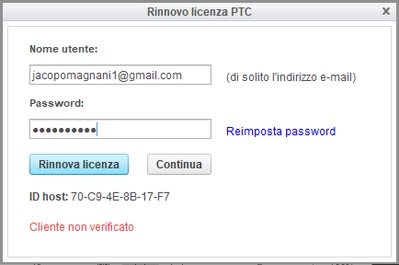
JM_9296441_0-1605020659959.png


cliente non verificato = Not verified customer

5 replies

24-Ruby III
November 11, 2020

@Alex_Cazacu 

17-Peridot
November 13, 2020

Hello,


Are you licensing Free Creo 6.0 Student edition? If so, please send me a private message with your email and I'll send you a license for 70-C9-4E-8B-17-F7 Host ID.


Thanks,

Alex

1-Visitor
January 4, 2021

Sorry, I think I have the same question to ask you, what measures should I take next?
The current modeling is halfway through and the file cannot be opened because the student version expires today. I will graduate in June this year. Can I continue to use it? Thank you!

擷取.JPG擷取1.JPG擷取2.JPG

1-Visitor
January 24, 2021

I assume you tried the license renewal from the setup.exe of your installation folder. If not, then run the setup program as if you were installing the prohram, but instead on the PTC Installation Assistant screen just choose "Setup license". Accept and acknowledge the agreements, and in the License Identification use Simple License Entry. In the blank field type in your product code and click Install Licensing. In the popup enter your username and password to verify credibility. That should solve your issues. I have also had some issues with Licensing. I tried several times, and succeeded. 

3-Newcomer
May 22, 2021

Hello dradakovic, where can I the installation folder? Is this it? Notice that I have my Creo 6 Student Version installed in a G drive, an external SSD. I made my own Program Files folder and installed Creo there. Thus, there is no "PTC" folder. There is just a "Creo" folder and a "Creo 6.0.2.0" folder. I open the Creosvcs_64 file and the bottom picture appears. I clicked Repair but it took a while and didn't do anything.

is this it the installation folder.png

is this the setup program.png


1-Visitor
January 24, 2021

I renewed it just now. Everything works fine.

1-Visitor
October 6, 2022

I had the same problem, and this is how I renewed my student license by following the Relicense Guide (ATTACHED).

Hopefully this works for others.


Search in this file path (Note that the path may not be exactly the same):

C:\Program Files\PTC\Creo 8.0.0.0\Parametric\bin


For this file:

reconfigure.exe


Click on the file once, then right click and Run as Administrator.

If prompted, allow the app to make changes to your device.


creopage1.JPG

Once you see this Introduction page, click next to enter the Licenses Page


RC_10037669_0-1665072071445.png


On the licenses page, open the Node Locked Licenses drop-down and enter this value: BK800908EDSTUDENTEDUNI


You will then be asked to enter your username and password, and it will install the new license.


Click through everything from there until you are finished and open Creo to test that it will allow you to use it.

1-Visitor
March 12, 2023

Thank you. It works.