
Solved
Part color choices in Creo
Is there a way to get more color choices in the student and academic versions of Creo? Many of the team robot models appear to have many more colors for their parts that we can't seem to find.

Is there a way to get more color choices in the student and academic versions of Creo? Many of the team robot models appear to have many more colors for their parts that we can't seem to find.
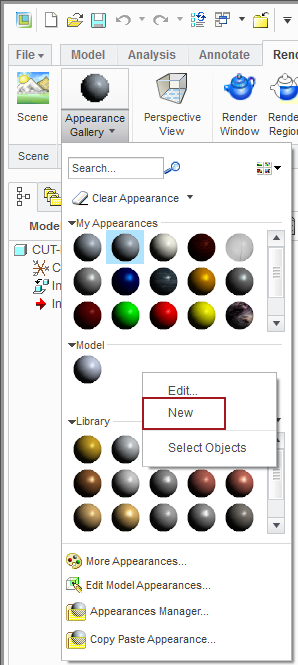
Sure, just right click in the Model section of the Appearance Gallery and pick new. Creo does not come with a deep selection of colors. It's just as easy to create your own and then share from model to model.
You can also pick the Appearances Manager at the bottom of the Appearance Gallery and manage your own color library.
PS. "Appearance Manager" is the search string for Creo Help Center if you want to read more.
Enter your E-mail address. We'll send you an e-mail with instructions to reset your password.