
1-Visitor
November 7, 2016
Question

Problem installing Creo 3.0 Academic version

  • November 7, 2016
  • 2 replies
  • 5807 views

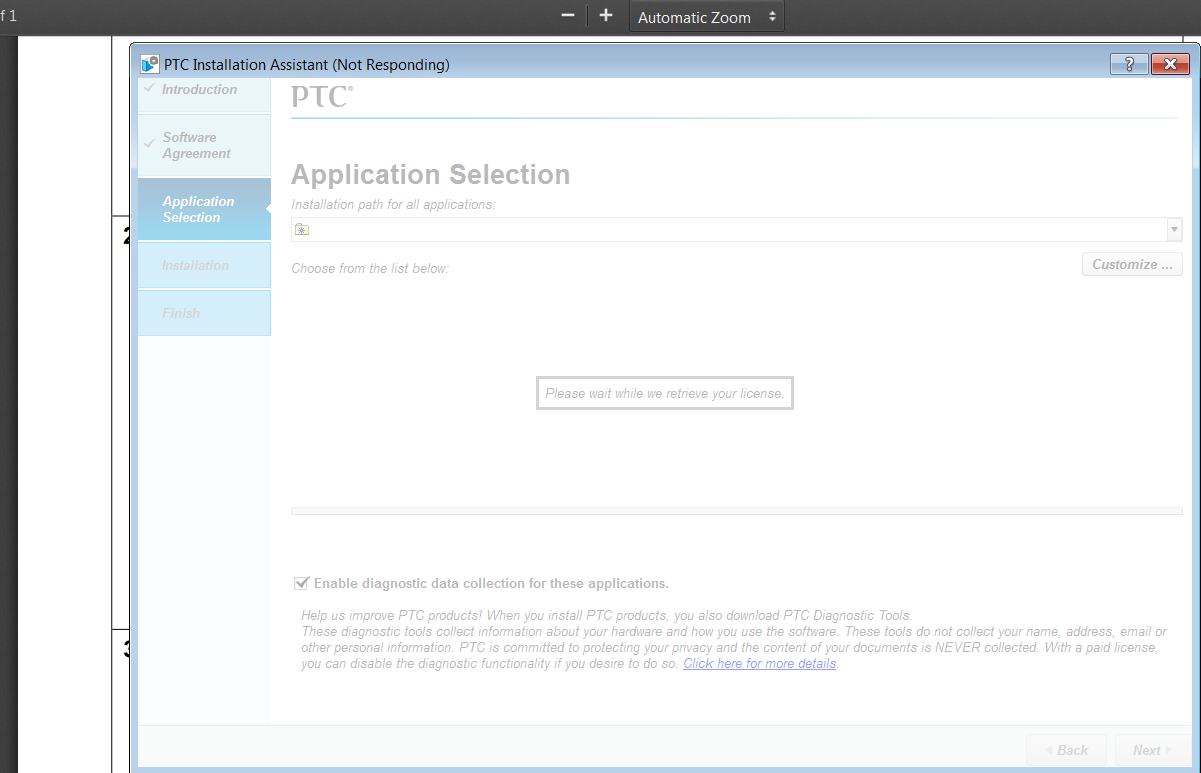
I have been trying to istall CReo 3.0, but I haven't been able to do it. The instalation always get's stuck where in the Aplication Selection part. There is a meesage that sasy please wait while we retrieve your license and it gever goes beyond that. Thank you for your helpUntitled.png
    2 replies

    24-Ruby III
    November 8, 2016

    Hi,

    please describe step by step, what exactly you did.

    For example:

    • went to PTC web page ... publish its URL
    • downloaded installation media ... which one ?
    • unzipped downloaded zip file
    • run setup.exe
    • and so on ...

    Is your computer connected to Internet ?

    MH

    1-Visitor
    November 9, 2016

    In addition, when I execute setup.exe (instead of setup-school.exe) I get an error message like this:

    Untitled33.png

    24-Ruby III
    November 9, 2016

    Hi,

    Your problem can be related to network card MAC address. Maybe installation is not able to get your network card MAC address.

    I can check network card status for you, if you publish contents of ip.txt file created by following command entered in DOS prompt window.

    ipconfig  /all  > ip.txt

    Also check what files are saved in C:\ProgramData\PTC\Licensing directory.

    MH

    8-Gravel
    November 11, 2016

    Hi PTC,

    Thanks for supporting us! But we got problem with installation.

    Bug report here...M070 cannot install, first thing is when i put

    BH400407EDSTUDENTEDK12, error;

    BK400407EDSTUDENTEDK12, error;

    BK390206EDSTUDENTUNICL, error,

    BK400407EDSTUDENTUNICL, error;

    BH400407EDSTUDENTUNICL, error - this one gives me a license email.

    and i manually load the license file, successed.

    then during installation, most of processing bar just show red, and crashed in 10-15 second,

    Thumbnail Viewer installed success

    Creo View Express installed success

    attach the pim_installmgr.log here

    https://goo.gl/4GU66z

    attach the traceback.log here

    https://goo.gl/JS3VyU


    computer: Windows 10 Enterprise, Build 10240, 32GB memory, i7-5960x, install on c:/, setup file in c:/, setup.exe is runned as admin.


    Before was fine on this computer, i had creo before, with setup.exe, not the one with school-tab, with the serial number BH400407EDSTUDENTEDK12, -


    Please take a look, thanks! It's not just me, our mentor also has the same problem, he's on windows 7, i manually load the license from email in, installation process did not crash.

    Gary Chen

    FRC Team 4001

    8-Gravel
    November 11, 2016

    last time success install with M070 is September with the latest version i download from website, not quite sure if it's M060 or M070.