
1-Visitor
November 7, 2016
Question

Problem installing Creo 3.0 Academic version

  • November 7, 2016
  • 2 replies
  • 5807 views

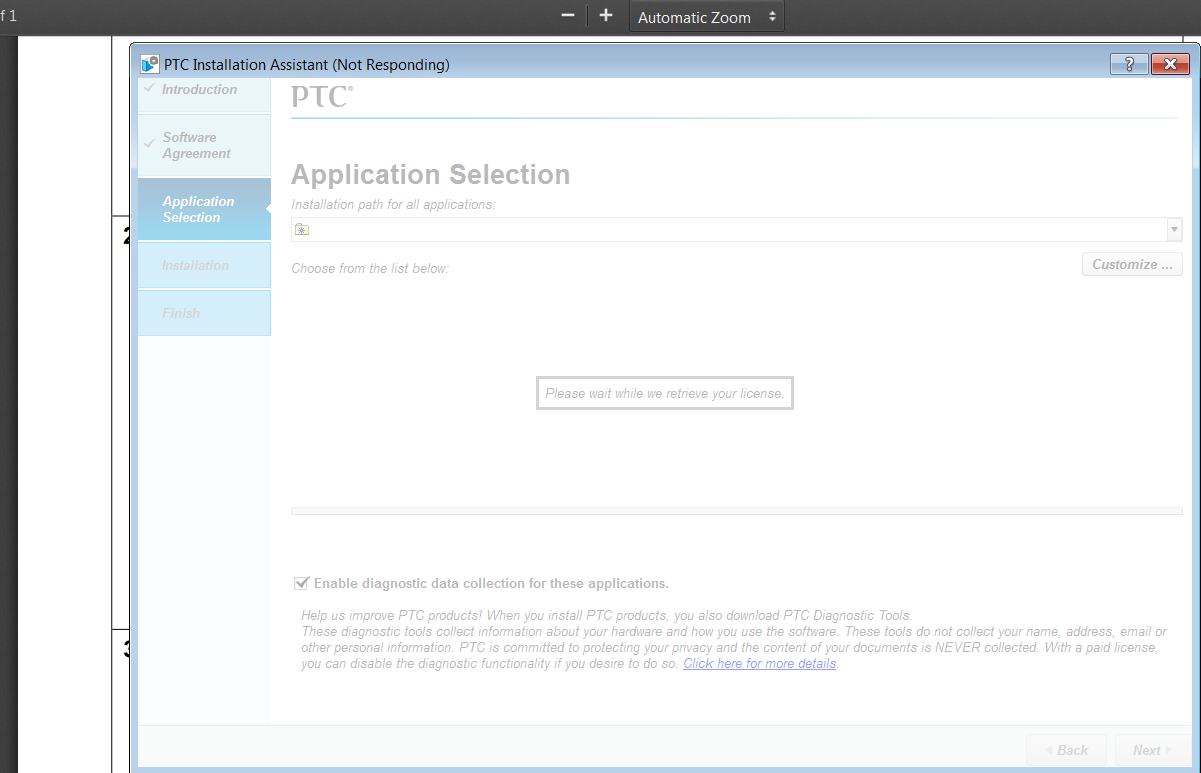
I have been trying to istall CReo 3.0, but I haven't been able to do it. The instalation always get's stuck where in the Aplication Selection part. There is a meesage that sasy please wait while we retrieve your license and it gever goes beyond that. Thank you for your helpUntitled.png
    2 replies

    24-Ruby III
    November 8, 2016

    Hi,

    please describe step by step, what exactly you did.

    For example:

    • went to PTC web page ... publish its URL
    • downloaded installation media ... which one ?
    • unzipped downloaded zip file
    • run setup.exe
    • and so on ...

    Is your computer connected to Internet ?

    MH

    1-Visitor
    November 9, 2016

    OK

    I went to http://www.ptc.com/academic-program/products/free-software/creo-college-download where I filled the form.

    After that I was sent to http://www.ptc.com/academic-program/products/free-software/creo-college-download/thank-you where I downloaded the installation instruction as a pdf.

    I opended the pdf, opened the link www.ptc.com/appserver/auth/it/esd/academicFree.jsp‌‌ ,

    I created a student account to download the file in www.ptc.com/appserver/common/account/ptcacademic.jsp

    I accepted the export agreement and  downloanled Creo 3.0 version WIN 64 DVD

    I disable the antivirus and firewall

    I unzipped the file and executed setup-schools.exe as administrator

    In the installation wizard I accepted the software license agreement and I checked the compliance box, then clicked next.

    Then I get a window that says that I need to log in to PTC.com and after entering my information the program stops working.

    Yes I have internet, and I also tried with Creo2.0 but I get the same error.

    8-Gravel
    November 11, 2016

    Hi PTC,

    Thanks for supporting us! But we got problem with installation.

    Bug report here...M070 cannot install, first thing is when i put

    BH400407EDSTUDENTEDK12, error;

    BK400407EDSTUDENTEDK12, error;

    BK390206EDSTUDENTUNICL, error,

    BK400407EDSTUDENTUNICL, error;

    BH400407EDSTUDENTUNICL, error - this one gives me a license email.

    and i manually load the license file, successed.

    then during installation, most of processing bar just show red, and crashed in 10-15 second,

    Thumbnail Viewer installed success

    Creo View Express installed success

    attach the pim_installmgr.log here

    https://goo.gl/4GU66z

    attach the traceback.log here

    https://goo.gl/JS3VyU


    computer: Windows 10 Enterprise, Build 10240, 32GB memory, i7-5960x, install on c:/, setup file in c:/, setup.exe is runned as admin.


    Before was fine on this computer, i had creo before, with setup.exe, not the one with school-tab, with the serial number BH400407EDSTUDENTEDK12, -


    Please take a look, thanks! It's not just me, our mentor also has the same problem, he's on windows 7, i manually load the license from email in, installation process did not crash.

    Gary Chen

    FRC Team 4001

    24-Ruby III
    November 11, 2016

    Hi,

    pim_installmgr.log contains a lot of error messages ... Error trying to extract: Unable to open cabinet: ... and so on

    It looks like your installation media is corrupted.

    MH

    8-Gravel
    November 11, 2016

    Hi MH,

    i don't think installation media would be corrupted, since everything is on c drive, and i just install bunch of other software like autocad and adobe things. Setup file...i downloaded 3 times from ptc website, same result. i think the error might relate to the license, cause i feel like creo is trying to write the generated license file to drive, but failed(the license automatic send to email seems like to be ok), and while extracting things, also has error with writing things to destination.

    my thought only, just a guess.