
1-Visitor
September 26, 2020
Question

creo

  • September 26, 2020
  • 1 reply
  • 840 views

Hello,

I have installed CREO 6.0 student edition yesterday it was working smoothly without any issue, but in morning when I open the CREO its not working and showing warning message that " License request is failed for the feature".
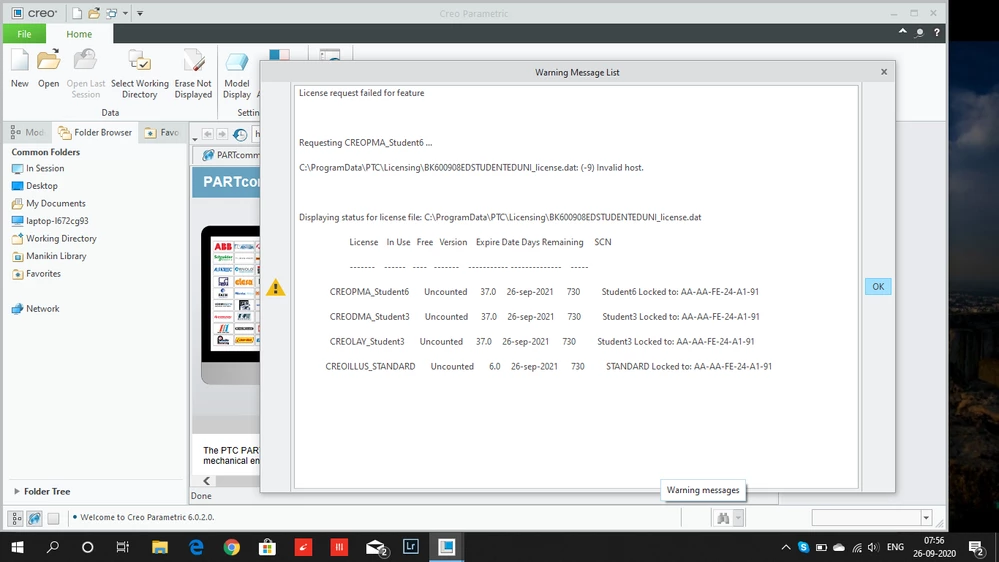
this is warning comingthis is warning coming

1 reply

24-Ruby III
September 26, 2020

@KB_9637297 wrote:

Hello,

I have installed CREO 6.0 student edition yesterday it was working smoothly without any issue, but in morning when I open the CREO its not working and showing warning message that " License request is failed for the feature".
this is warning comingthis is warning coming

Hi,

I guess that yesterday your Windows 10 assigned physical address AA-AA-FE-24-A1-91 to your Wi-Fi network card. Today your Windows 10 assigned different physical address, probably because of Use random hardware addresses option is on. See https://winaero.com/enable-random-mac-address-in-windows-10-for-wi-fi-adapter/ page.

Solution:

  • set Use random hardware addresses option to off
  • reinstall Creo and request new license