1-Visitor
March 17, 2021
Solved

shortcuts of creo

  • March 17, 2021
  • 1 reply
  • 4543 views


Spoiler
 

hello guys,


ive just installed creo 7.0, but once i want to start creo parametric(or other programs) via the desktop shortcut, nothing happens and the file explorer opens. Can anyone help me?


best regards,

Jan

Best answer by MartinHanak

@JD_8823675 wrote:

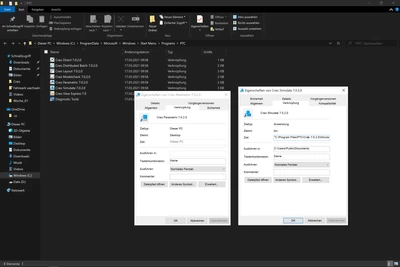
ive noticed that there are some fields missing compared to creo simulate

Screenshot (61).png


Hi,

  • go to C:\Program Files\PTC\Creo 7.0.2.0\Parametric\bin directory
  • select parametric.exe file, press right mouse button and select Copy
  • click on desktop, press right mouse button and select Paste a shorcut
  • edit Properties of shortcut ... put path to your working directory into Start in field


1 reply

24-Ruby III
March 17, 2021

@JD_8823675 wrote:


Spoiler
 

hello guys,


ive just installed creo 7.0, but once i want to start creo parametric(or other programs) via the desktop shortcut, nothing happens and the file explorer opens. Can anyone help me?


best regards,

Jan


Hi,

copy shortcut from C:\ProgramData\Microsoft\Windows\Start Menu\Programs\PTC directory.

1-Visitor
March 17, 2021

hello, unfortunately **bleep** still doesnt work with parametric, simulate works fine. ive attached a video showing it.

24-Ruby III
March 17, 2021

@JD_8823675 wrote:

hello, unfortunately **bleep** still doesnt work with parametric, simulate works fine. ive attached a video showing it.


Hi,

check Properties of Creo Parametric 7.0.2.0 shortcut.