
1-Visitor
May 5, 2015
Question

Help: Adding unit (mm) to a variable increase value by 0.00000000000003, why?

  • May 5, 2015
  • 2 replies
  • 3357 views

Hi there.

I just noticed that when add 2 variables defined as length (mm), the resut increase the value of 0.00000000000006.

Can someone help me figure out why?

As you can see from the picture below, adding the unit after the addition removes the error.
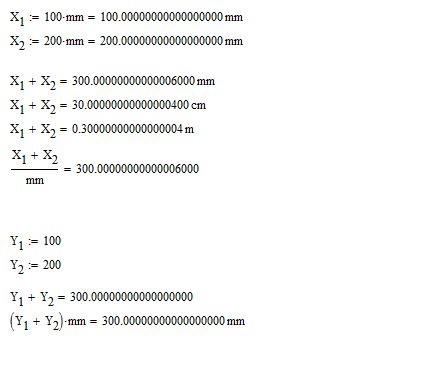
math1.JPG

Result Format

Format: General

Number of decimal places: 17

Show trailing zeroes: yes

Format units: yes

Simplify units when possible: yes

2 replies

1-Visitor
May 5, 2015

I assume that has to do with the "float" representation of numbers (if you don't know what that is, I am sure wikipedia has a great article about it with all the details).

In short, when represented as "float", not all numbers can be described and stored by a computer. If you define a variable with such a value, it will probably be rounded to the closest number that the computer knows about.

note : the error is about 10^-15. It must be one hell of an application if you are worried about such a tiny error. I know there are some such applications (GPS, for instance), but still, not very common ...

dbull1-VisitorAuthor
1-Visitor
May 5, 2015

Thank you for the reply Adrien,

But wouldn't that only be a problem with complex numbers with number below 10^-17 (which seems to be mathcads limit)?

In this case I ask the program to do 100+200, which should result in 300. I give no additional inputs of any value, only unit.

How I read it, it seems that at some point mathcad evaluate the defining of units as a number. And as far as I can tell, it's only for (mm)

Could this perhaps be a bug, or just in my settings?

Note: This is not for anything as fancy as a GPS or rocket science.

I'm currently creating a simple automatic tolerance check. The problem is that later on I use a program to determine if a value is too low or high depending on given criteria.
Now in this scenario if I had the maximum allowed tolerance as 300mm, the output would be Fail due to too high dimension.

Setting Zero threshold does not help eiter since mathcad stores the full value of the variable, and are therefore, above the accepted value.

+It really enoys me that I don't understand where the extra 6*10^-15 comes from.

19-Tanzanite
May 5, 2015

It's numeric roundoff. This is inherent to numerical computing. A 64 bit float only has about 15-16 digits of precision, and any comparison has to take this into account. That's why you should turn off exact equality checking in the worksheet options.

Why do you only see it with certain units? Because Mathcad converts any quantity to the base unit (in this case meters) and stores that. Like every numerical operation, that conversion results in roundoff error.

23-Emerald V
May 5, 2015

Have a look at the help for the Truncation and Rounding functions ...

Note that this limitation applies to any software that uses a fixed-width binary number internal representation of floating point numbers; it's not Mathcad specific.

If you need more precision, then try using the symbolic processor (although, you must bear in mind that it's not unit-aware; unlike the numerica processor, which is specifically designed to handle units).

Stuart

dbull1-VisitorAuthor
1-Visitor
May 5, 2015

Thank you Stuart,

This helped alot for my spesific case. Using round(z,n) with n=3, for 3 decimal places worked like a charm.

I am still confused about why and how the problem occured in the first place.

But for now I am content.

-Daniel

1-Visitor
May 5, 2015

Like both Stuart and I said, this is an issue that is intrinsic with float representation. This has to do with how computers actually store numbers as data (remember computers know only 1s and 0s, not 17-digit-long decimal numbers).

I have no idea why it just appears with units. Likewise, I know of a process in Excel that can place "7" in a cell, and return false when the content of this cell is compared to 7, which means that, somehow, there are 2 different representations of the number 7 (the one that is the result of said process, and the one that it is compared to). If someone has an explanation for that, I am very interested. Otherwise, I just accept the situation, and do 10^-12 rounding where needed ...