15-Moonstone
March 27, 2018
Solved

Matrix In Mathca Prime

  • March 27, 2018
  • 4 replies
  • 5047 views

Dear everyone,

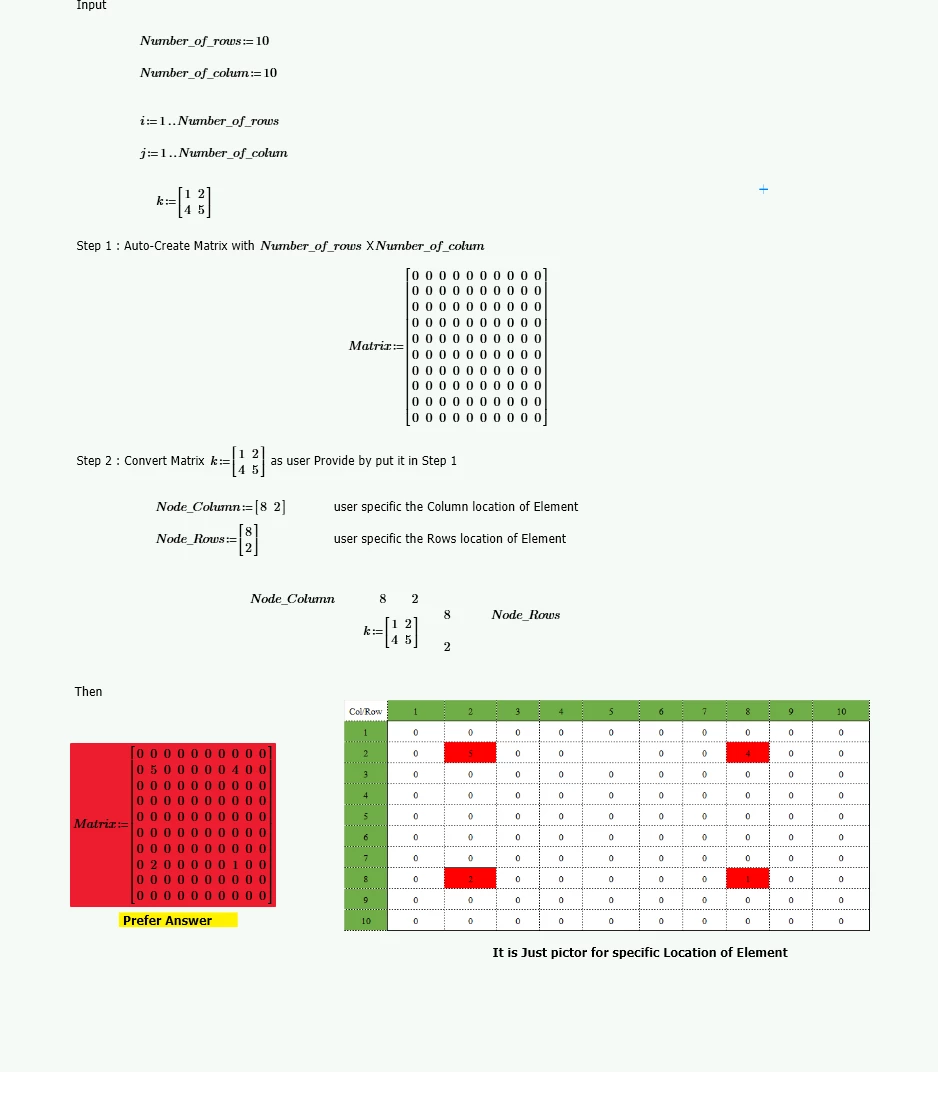
Please solve this in Attachment Picture

Step1
How to Auto-create Matrix with nxn ?

Step2 

Put  Matrix provide in Step 1 by Column and Rows User Instruct.

Many thank
PC-9.png

Best answer by LucMeekes

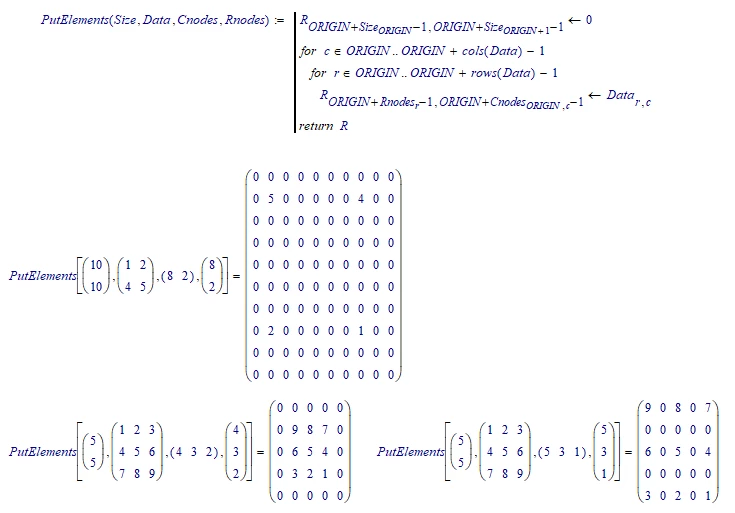
Here's a function that does what you want in one go. It creates the empty matrix (rows and columns as provided by the first parameter Size), and puts each of the elements of the provided matrix (second parameter  Data) on the respective column and row node positions (as specified by the third and fourth parameters Cnodes and Rnodes respectively). LM_20180327_PutElements.png
You'll have to type the function in Prime yourself, since I'm limited to Prime express.

But I can view your Prime sheets, so if you need more help, just come back here.


Success!

Luc

4 replies

24-Ruby IV
March 27, 2018

One way

Mij.png

21-Topaz II
March 27, 2018

Hi,


autoCreating an nxn matrix.  

Just set the last element to zero.

Watch the value of ORIGIN which will change the outcome.

File enclosed to demonstrate this.

21-Topaz II
March 27, 2018

Hi,


Here is how to do the insertion you asked for.

File enclosed

15-Moonstone
March 27, 2018


@terryhendicott wrote:

Hi,


Here is how to do the insertion you asked for.

File enclosed


hi terryhendicott

I have seen your comment. It also work well

Are you Civil Engineer?

21-Topaz II
March 27, 2018

Hi

I am retired civil/structural and project engineer

LucMeekes23-Emerald IVAnswer
23-Emerald IV
March 27, 2018

Here's a function that does what you want in one go. It creates the empty matrix (rows and columns as provided by the first parameter Size), and puts each of the elements of the provided matrix (second parameter  Data) on the respective column and row node positions (as specified by the third and fourth parameters Cnodes and Rnodes respectively). LM_20180327_PutElements.png

You'll have to type the function in Prime yourself, since I'm limited to Prime express.

But I can view your Prime sheets, so if you need more help, just come back here.


Success!

Luc

15-Moonstone
March 27, 2018
Ok 👍
It seems work, I will try in Prime
