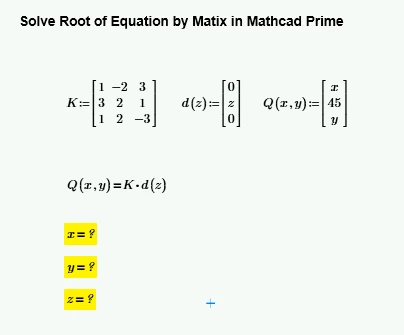
My first try was to copy the equation you want to solve and use the symbolic solve command ... and it fails
I retyped the equation myself and ... it worked!
Confusion, but after playing around a little bit I found out that its again Primes auto labeling which causes the error. This "feature" is more pain than anything. If you manually set the label of x and y in the expression Q(x,y) from "variable" to "automatic" it also works with the expression you have typed.
And of course you always can use the good old numeric solve block, which most of the times is the better alternative to symbolics anyway if you are just after numeric results. The solve block seems to be much less sensible concerning labels - it also works using the original expression.
My first try was to copy the equation you want to solve and use the symbolic solve command ... and it fails
I retyped the equation myself and ... it worked!
Confusion, but after playing around a little bit I found out that its again Primes auto labeling which causes the error. This "feature" is more pain than anything. If you manually set the label of x and y in the expression Q(x,y) from "variable" to "automatic" it also works with the expression you have typed.
And of course you always can use the good old numeric solve block, which most of the times is the better alternative to symbolics anyway if you are just after numeric results. The solve block seems to be much less sensible concerning labels - it also works using the original expression.
Thank you so much @Werner_E . it working.
but I have question relate to this topic as Pic Attach and File Attach 1. Create Auto Variable in Matrix?