1-Visitor
July 17, 2019
Solved

Ploting an elliptical curve

  • July 17, 2019
  • 6 replies
  • 12402 views

Hello everyone,

Sorry if it has ever been answered before. I have tried to find the solution but I have not been able to solve it.

I would like to plot an equation (in prime 4.0) with a shape similar to an ellipse.


In the end I should get different shapes for different lambda values.

Thank you!

Sergio.
Best answer by -MFra-

Hi,

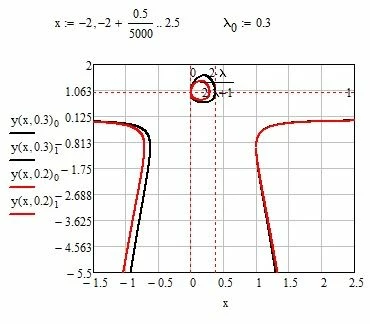
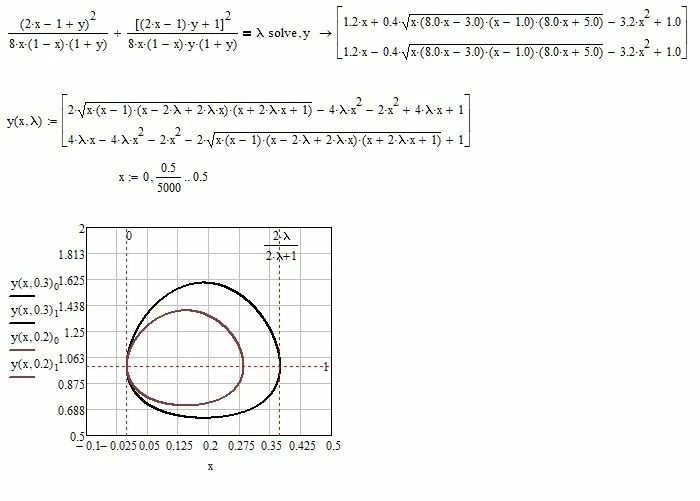
you could do so:

forStoledano.jpg

a more complete chart is as follows:

forStoledano 1.jpg

6 replies

-MFra-21-Topaz IIAnswer
21-Topaz II
July 17, 2019

Hi,

you could do so:

forStoledano.jpg

a more complete chart is as follows:

forStoledano 1.jpg

25-Diamond I
July 17, 2019

Prime does not support implicit plots, but you could use a contour plot.

You must type multiplication signs between a variable an a parenthesis as otherwise Prime assumes you are typing a function.

B.png

16-Pearl
July 17, 2019

As a follow-on from Werner's, here's a CreateMesh option.  Using high enough mesh density the colors vanish (I assume because mathcad gets confused at the convergence point) but a possible advantage for you.  MF's solution works also but you'll get some gaps on the right end of the ellipse at times.

2019-07-17_12-23-03.png

25-Diamond I
July 17, 2019

@DJF wrote:

As a follow-on from Werner's, here's a CreateMesh option.  Using high enough mesh density the colors vanish (I assume because mathcad gets confused at the convergence point)


Normally the mesh density does not has much effect on the colors but in this case it obviusly has. Funny effect for a mesh size of 80 to 90. Alas, its Prime. Mathcad wasn't perfect in no way but we still had more way to infuence the plot (like number of iso lines, see the pic) but 3D-plots in Prime really suck.

B.png

24-Ruby IV
July 17, 2019

May by this article will be interesting for you

A New Ellipse or Math Porcelain Service


24-Ruby IV
July 17, 2019

Solution without animation is not solution!

Labbda.gif

25-Diamond I
July 17, 2019

Who claims that Mathcad can't do implicit plots?

Thanks to Viacheslav N. Mezentsev even Prime can do it 😉

B.png

16-Pearl
July 19, 2019

Can anyone explain how Mathcad is able to plot this implicit (ala Werner via Mezentsev) graph?  The data isn't sequential yet we get a smooth curve plotted.  (I had some crazy thoughts of fitting some b-splines to it, but hit some immediate snags given the format) 

 2019-07-19_9-08-21.png

25-Diamond I
July 19, 2019

Looks like Viacheslav uses 1j instead of NaN to separate the various line segments.  So the "curve" you see consist just of a number of line segments which are not drawn in consecutive order.

Those segments are not in order but as a whole make up for the complete curve (which sometimes sure has some "holes". If you want to apply a fit you would first to have to get rid of the 1j's and sort the various line segments.

I never took the time to make a more intense look into his routine - just was impressed that its possible to do with reasonable speed.

Also impressive is his implicit3D.

Stoledano1-VisitorAuthor
1-Visitor
July 20, 2019

Sorry for asking again.Maybe I didn't learn well...

I need to plot something similar to the last one, but this time (for me ;)) it is more difficult...


25-Diamond I
July 21, 2019

@Stoledano wrote:

Sorry for asking again.Maybe I didn't learn well...

I need to plot something similar to the last one, but this time (for me ;)) it is more difficult...


You just provide some, on first sight, unrelated formulas, provide a picture of a plot which does not show which quantities you apply on the respective axes and you expect us to put together all the missing information?

DJF seems to have polished his crystal ball and collected the loose ends correctly.

If you don't show, which way you wanted to go and where you failed its hard to help.

You never commented on the various suggestions to solve your first problem so we cannot know which approach you gave a try.

You marked the suggestion with the upper and lower half of the curves as being the "solution", so we can conclude that this is the approach which you liked most. A similar approach can be applied here, too. You will not succeed in solving the equation for M, but you can use a solve block to do so. Depending on the guess value you get a point on the upper half or the lower half (M1 and M2 in the picture below).

B1.png

I gave it a try and it worked, but nevertheless I'd prefer the approach using uno's "implicitplt2D", as its faster and more versatile. But you get the result you are looking for with both methods. Guess you can forget about the 3D-contourplot approach because 3Dplots in Prime really are too mediocre.

B.png

16-Pearl
July 24, 2019

Ok, here's my take on area calculations.  First I had to create some tools to sort the Implicit2D output into unique points and then sort them into order.  I used nearest-neighbor approach which won't always work.  Then I calculated area using trapezoidal rule.  Then for fun I added some b-splines through them.  And to be complete I did one Monte Carlo area calculation.   

2019-07-24_10-09-44.png2019-07-24_10-09-26.png

5.0 and pdfs attached.