1-Visitor
July 30, 2021
Solved

Programming Newbie need some help

  • July 30, 2021
  • 2 replies
  • 4304 views

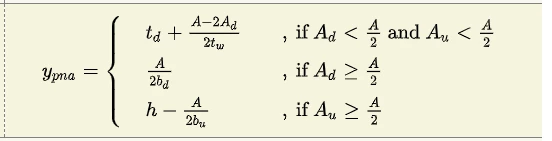
I'm relatively new to Mathcad but I enjoy the program very much and I need some help. I would like to program the following section
Mathcad question.png

but I have no idea where to begin.


Your help will be appreciated.

Regards,

Best answer by LucMeekes

The error message probably goes a little further: "Check that the label is set correctly".

This part is important. Prime automatically labels your identifiers as 'variable', 'unit', 'function', 'constant' etc.

Or it sets the label as '-', which means  automatic.

Labels of identifiers must be the same for the items that you think must be the same.

Now that fact that Prime automatically labels identifiers means that it also may automatically go wrong. And that happens more often then you might think. It happened here.

Check the labels of all parameters to the function with those used in the definition.


Success!
Luc

2 replies

23-Emerald IV
July 30, 2021

Like this?

LucMeekes_0-1627639643404.png

Or do you like this better:

LucMeekes_1-1627640140267.png


Prime file attached.


Success!

Luc

1-Visitor
July 30, 2021

Hi LucMeekes


Thank you very much. I've pasted in your attached file but I get a "This value is undefined" error for the Ad value which is strange because it is defined??


Again thank you for your help.

25-Diamond I
July 30, 2021

Luc provided a function and you cannot numerically evaluate a function definition. So you would have to delete the equal sign at the end and use it as a function:

Werner_E_0-1627642295854.png

Or you turn the function into the definition of a simple variable:

Werner_E_1-1627642357703.png


25-Diamond I
July 30, 2021

The definition of y.pna you provide is missing to clearly define which value should be used if both A.d and A.u are greater or equal A/2! Should it be the second or the third expression?


You did not say if you are using real Mathcad (version 15 or below) or rather just Prime. I assume you are using Prime and here is one of various ways to achieve what you are asking for (I simplified the variables, values and return values):

Werner_E_1-1627639878236.png

It makes it much easier to test this program with different input values if you change it to a function in a and b:

Werner_E_2-1627639968539.png

And here are a few other ways to achieve the same (note the difference in y(6,7), the case which is not clearly defined by your expression):

Werner_E_3-1627640077129.png

In case you are do use Mathcad (15 or below), "else" has to be replaced by "otherwise" and the display it a bit different (more compact):

Werner_E_0-1627640998285.png


1-Visitor
July 30, 2021

Hi LucMeekes and Werner_E


WOW!👍 Thank you guys, as a first-time user of the community I'm completely blown away by your responses.

The solutions are clear and easy to follow, my Mathcad knowledge has grown a lot😁.


Thank you again!!!!