
Solved
Change Cache path
- July 6, 2022
- 1 reply
- 4905 views

A VPN connection is really no different than just plugging a network cable from your computer into their network (virtually). Creo still runs locally on your computer (unless you are using some kind of remote desktop software to remotely view a different computer on their network.)
While it is technically possible to configure the Windchill cache to be located on their remote file server, I wouldn't recommend it for performance reasons. You're going to run into problems anytime the VPN connection has a hiccup and Creo is running.
The 'Start In' location has no impact on the Windchill cache location. They are two completely different things.
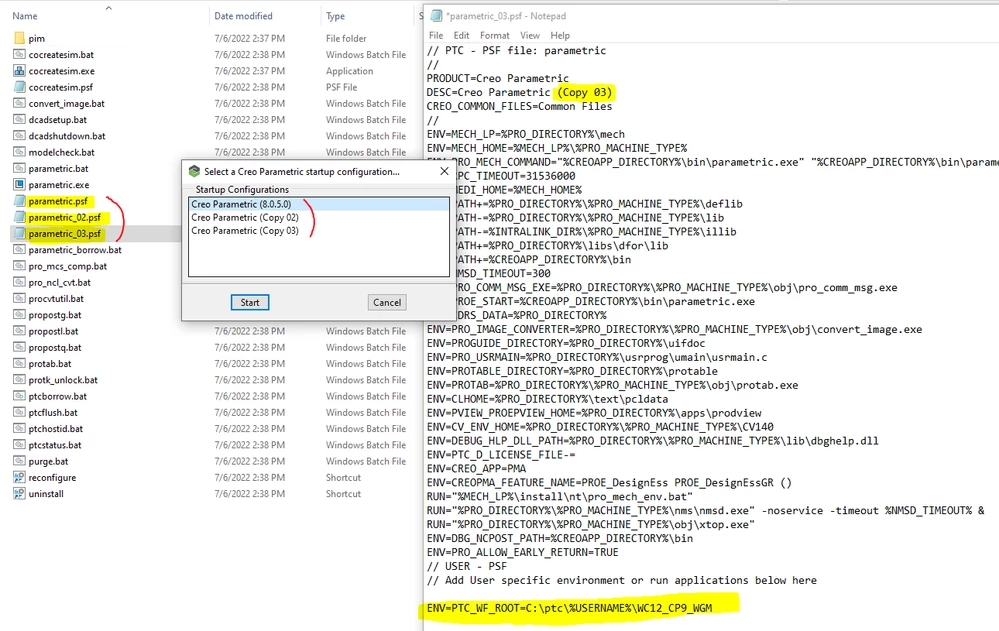
If you have multiple customers and you need to connect to multiple different Windchill systems, it is possible to configure Creo to use a different cache location for each one. The easiest way to do that is probably to just duplicate the .psf file and then put the environment variable for the cache at the bottom of each one. When you start Creo you will be presented with a list of options to choose from - one for each .psf file. Just pick the one you want to start.
Enter your E-mail address. We'll send you an e-mail with instructions to reset your password.