
2-Explorer
October 1, 2014
Solved

Change Overlay Unreformed Edge Color

  • October 1, 2014
  • 2 replies
  • 1179 views

Is this possible? I'd like to set the color to black (purple is the default) and I looked for a config option to do so, but I had no luck finding one.Edge_Color.png

This thread is inactive and closed by the PTC Community Management Team. If you would like to provide a reply and re-open this thread, please notify the moderator and reference the thread. You may also use "Start a topic" button to ask a new question. Please be sure to include what version of the PTC product you are using so another community member knowledgeable about your version may be able to assist.
Best answer by mfischer

Hi Shaun,

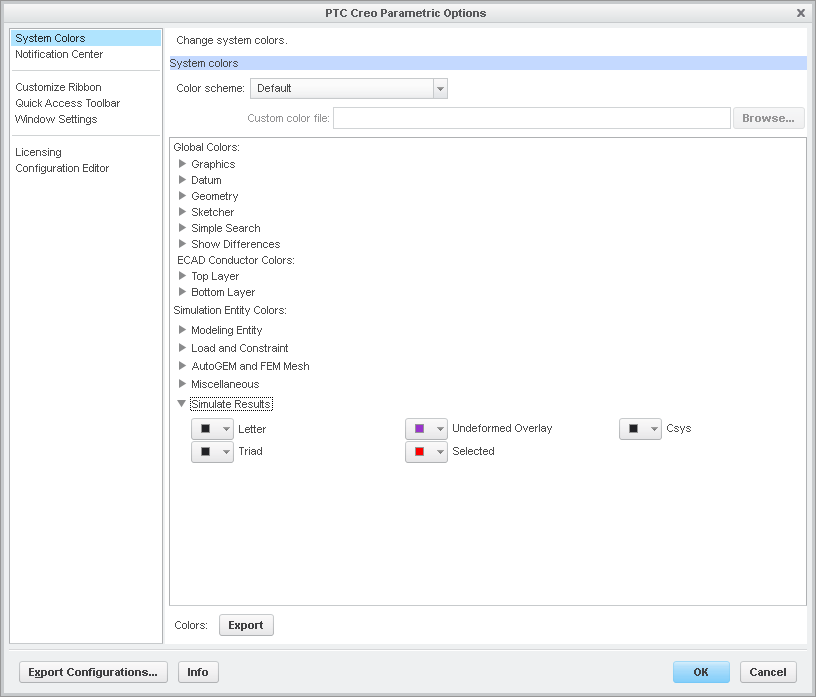
In Creo Simulate 3.0, we enabled users to modify Simulate Entity Colors via the Options dialog (System Colors). See image below.

options.png

With this enhancement, you can set your own color preferences for Simulate entities and save them to be used in future sessions.

Hope this helps.

Thanks,

Mark

2 replies

1-Visitor
October 6, 2014

Have you found the color somewhere in the system colors (UI).

Not sure whether there is a config.pro option for every system color, but it probably is a good start.

mfischer18-OpalAnswer
18-Opal
October 6, 2014

Hi Shaun,

In Creo Simulate 3.0, we enabled users to modify Simulate Entity Colors via the Options dialog (System Colors). See image below.

options.png

With this enhancement, you can set your own color preferences for Simulate entities and save them to be used in future sessions.

Hope this helps.

Thanks,

Mark