
1-Visitor
February 20, 2020
Solved

Creo 4 Failed to connect to server

  • February 20, 2020
  • 1 reply
  • 10067 views

Hello, 

I have recently installed Creo 4(M80) and it fails to run with error (-96) Failed to connect to server. Server is down or unreachable.

The thing is that i am at home connected via VPN to the network where licencing server is running. However when i brought my PC with me and physically connected my to the network, everything ran just fine.

I tried running it with firewall disabled on my PC as well as on the licensing server, but i keep getting the (-96) message. 

Any suggestions what to try next?


P.S. Don't mind the (-21) message
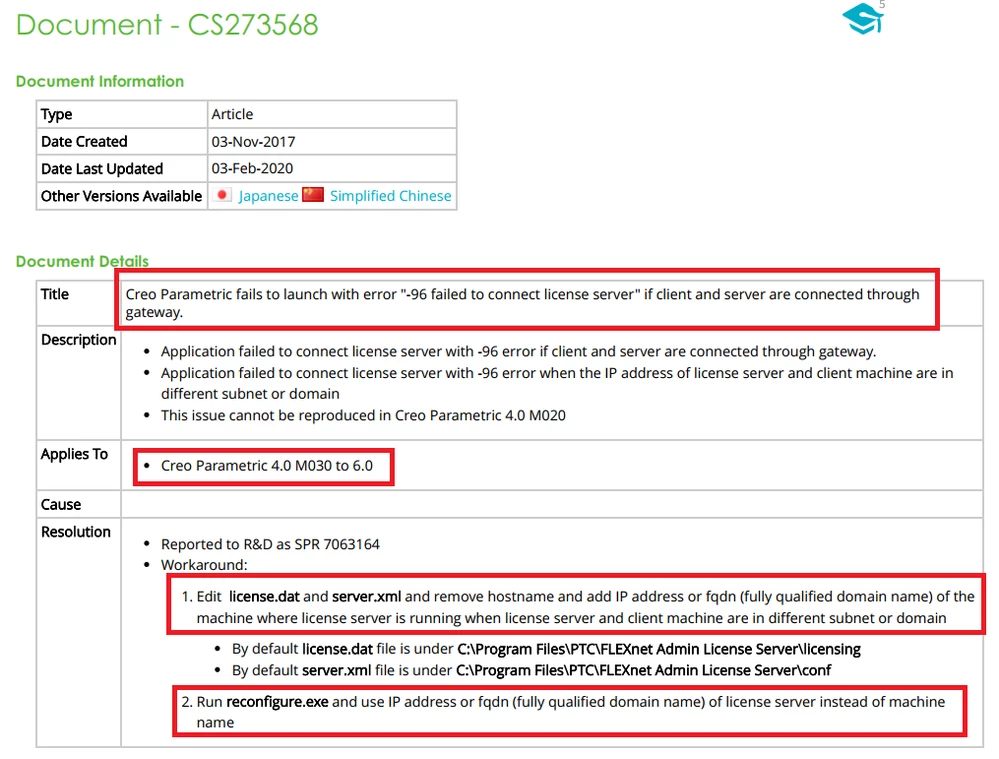
Best answer by MartinHanak

cs273568.png

Try the above mentioned advice.

1 reply

22-Sapphire I
February 20, 2020

@Dawek


As this is due to communication, check connectivity on port 7788 and also check for any other firewall blockages in vpn.


CS21768

Dawek1-VisitorAuthor
1-Visitor
February 20, 2020

I tried to use telnet to check the port connectivity. I typed: telnet xxx.xxx.xxx.xxx 7788 (xxx for the server IP) and the command line turned complete black with just a cursor blinking in top left corner. That means the port is open, right?

24-Ruby III
February 20, 2020

@Dawek wrote:

Ok, thanks.

I forgot to mention that i already did that. If you mean the hosts file located in C:\Windows\System32\drivers\etc. It now looks as in the picture, where black is server IP and red server name. 

hosts1.PNG


Hi,


1.]

In Command prompt window ... run ping servername command ... can you reach server ?


2.]

Error -96 is usually related to Firewall on license server.

Ask IT whether Firewall is activated on license server.

If Firewall is activated then ask IT to define incoming rules ... enable incoming communication for lmgrd.exe, lmadmin.exe, ptc_d.exe (these files are located in FLEXnet installation tree).