
6-Contributor
May 21, 2024
Solved

Creo Saved Server Disappears when running trail during launch of Creo

  • May 21, 2024
  • 1 reply
  • 1669 views

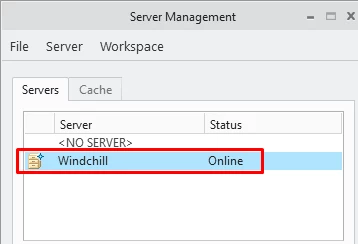
Utilizing the same configuration files and settings: If I start Creo without the trail file being automatically run and run it manually it works perfectly. 


Server Management - Without Trail File Ran Automatically
smarcus3_0-1716304647040.png


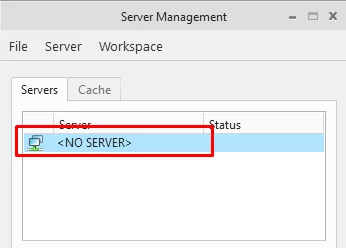
If I start Creo with the same trail file being run automatically the saved server is no longer shown. The trail file seems to run correctly as the second blank tab is opened successfully.


Server Management - With Trail File Ran Automatically
smarcus3_1-1716304702517.png


Not sure what is causing this.


Trail file is very simple as it just opens a second blank tab currently.

~ Activate `main_dlg_cur` `EMBED_BROWSER_SMARTAB_LAYOUT_buttons_lay_ph.pshNewPage_inside` 1
~ Activate `main_dlg_cur` `EMBED_BROWSER_SMARTAB_LAYOUT_buttons_lay_ph.page_0` 1
~ Trail `UI Desktop` `UI Desktop` `SmartTabs` \
`selectButton main_dlg_cur@EMBED_BROWSER_SMARTAB_LAYOUT_buttons_lay page_0 0`


The shortcut target is set to the following:

"C:\<INSTALL_PATH>\Parametric\bin\parametric.exe" "C:\<INSTALL_PATH>\StartupTrail.txt"


Thoughts on what is causing this

Best answer by Van_AG

You have automatically started the trail and there is only <No Server> in the "Server Management" window.

After that, just register (add) your wt-server manually again in the "Server Management".

Then restart Creo with your trail file.

Server registration will be kept.

1 reply

15-Moonstone
May 27, 2024

The trail breaks wt-authentification process.

You should start with the trail and register the server again.

It will force Creo to remember server status.

And then restart with the trail.

smarcus36-ContributorAuthor
6-Contributor
May 28, 2024

So trail file would set the website, then register the server each time? Wouldn't this remove user's workspaces? Or am I not understanding the suggestion. 


Appreciate the help.

Van_AG15-MoonstoneAnswer
15-Moonstone
May 30, 2024

You have automatically started the trail and there is only <No Server> in the "Server Management" window.

After that, just register (add) your wt-server manually again in the "Server Management".

Then restart Creo with your trail file.

Server registration will be kept.