


tbraxton
22-Sapphire II
22-Sapphire II
June 2, 2024
Solved

Creo+ unable to set the start in directory

  • June 2, 2024
  • 1 reply
  • 785 views

Creo+ 11.0.0.0-008

Changing the start in directory of the shortcut for Creo+ is not working. I am modifying the start in directory of the shortcut created on the desktop when installed. The desired path is visible in the shortcut properties but Creo+ is not starting in this directory when launched from the shortcut.
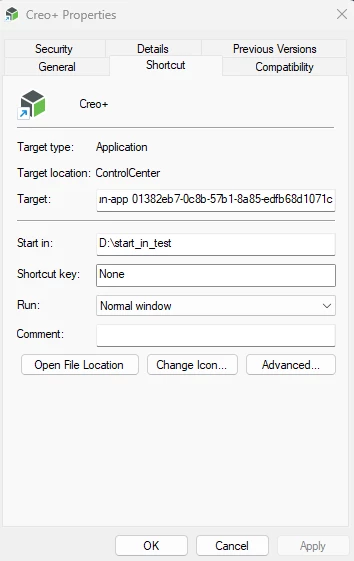
 

tbraxton_0-1717342406000.png


Best answer by tbraxton

FYI there is an SPR assigned to this issue to be fixed. There is a workaround available that worked for me testing for a single user.


Article - CS416506 - Start-in directory set in desktop shortcut not working in Creo+ (ptc.com)

1 reply

tbraxton
22-Sapphire II
tbraxton22-Sapphire IIAuthorAnswer
22-Sapphire II
June 2, 2024

FYI there is an SPR assigned to this issue to be fixed. There is a workaround available that worked for me testing for a single user.


Article - CS416506 - Start-in directory set in desktop shortcut not working in Creo+ (ptc.com)