

Solved
Custom drawing note text alignment problem
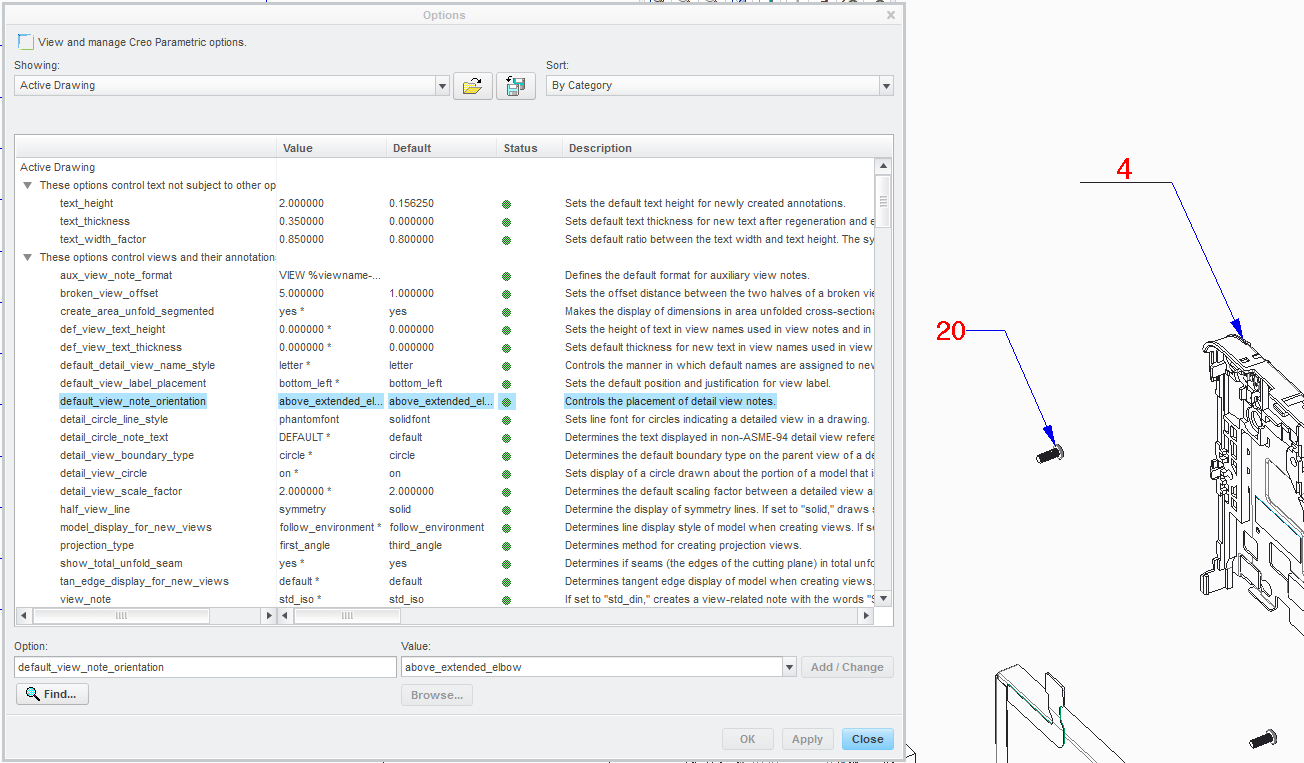
I am having an issue getting a note with leader to place the text above the elbow. I have the config and drawing detail set to above leader by default but the text still shows parallel and next to the leader line.
I am using this note as a custom BOM balloon to add reference numbers to the assembly drawing. We have custom balloons which are underlined numbers so that we don´t confuse the revision balloon symbol with a part number in the BOM. (Number 20 in the image should look like number 4)
I have spent almost an hour fighting with the config settings to try and solve this but it seems the system keeps reverting back to text default. Am I missing a setting somewhere which is overiding my config/detail options adjustments?
This thread is inactive and closed by the PTC Community Management Team. If you would like to provide a reply and re-open this thread, please notify the moderator and reference the thread. You may also use "Start a topic" button to ask a new question. Please be sure to include what version of the PTC product you are using so another community member knowledgeable about your version may be able to assist.