
1-Visitor
September 14, 2021
Question

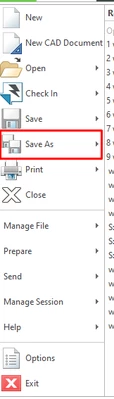
How can I prevent exporting from within the CREO ?

  • September 14, 2021
  • 3 replies
  • 7537 views

Hello, we are using Creo with windchill. For this reason, I want to prevent users from exporting data from creo. I want to remove all export options and save as option. How can I do that. Thanks in advance for all the help
 

emrecan_0-1631602585376.png


3 replies

21-Topaz I
September 14, 2021

I am pretty sure this is not possible. Even if it was there are valid reasons for needing to back up work offline. For instance if you want to leap frog from an old iteration to a new one you can pull down the old iteration, back it up, check out the latest iteration and then open up the old iteration from the backup and save over the top of the former "newest" iteration.


Backing up is also sometimes necessary to remove lingering external references.

24-Ruby III
September 14, 2021

Hi,

please provide the exact reasons why you want to do this. If you want to prevent data theft, then the only possible solution is probably to virtualize workstations with Creo installation.

21-Topaz I
September 14, 2021

Setting aside not trusting your employees, if someone really wants to steal CAD Models and they have the ability to check data in and out disabling the save as and backup is not going to prevent that. Creo downloads the models into a workspace. Anyone can go in and change the sid and lid files back to prt and assembly files just using windows explorer.


Not to mention that UI customizations can be over written by the user.

15-Moonstone
September 14, 2021

One solution I have seen which will help but not eliminate is to limit where data can be saved on the PC and how long it is retained until it gets deleted. So for example, you can only save to "c:\creo_temp" but that folder gets wiped every 24 hours, this doesnt eliminate the issue of saving to network drives. I think your problem is more business culture than technical, personally I would start with a reminder to the managers / Team Leaders about best practise and why its important to save into Windchill, maybe back that up with audits of locally saved CAD data (you could use a start up script to gather the data) to show team by team who is not following best practise.