
3-Newcomer
January 29, 2023
Solved

License request failed for feature

  • January 29, 2023
  • 1 reply
  • 7175 views

I have a node locked license of creo 3.0. My computer died and I am having trouble downloading and licensing the software on my new computer. Creo support is refusing to help because I don't have an active maintenance subscription. I was finally able to download the software when I found a link to the educational install - I'm hoping its the same. I downloaded my license file from ptc.com but it still has the mac address of my old computer. The installation software wouldn't let me license it. I tried putting the license file into the ptc folder mauall but that didn't work. I tried to manually change the mac address to match my new computer but I get the same error. What am I supposed to do?

Best answer by MartinHanak

@ML_7454596 wrote:

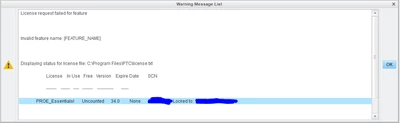
That seemed to get me closer. Now I get this additional information on the failure:

ML_7454596_0-1675110593088.png

In looking closer at my command prompt, I see that I used my bluetooth physical address....ooops. I see that there are many "physical addresses." Which one do I move the license to? There is one for the ethernet, fort he LAN1, for LAN2, for LAN WIFI.


Hi,

to resolve MartinHanak_0-1675151543691.pngerror message, edit parametric.psf file located in Parametric\bin directory in Creo installation once again.

This file must contain following line:

ENV=CREOPMA_FEATURE_NAME=PROE_EssentialsI ()


To be able to give you some advice concerning network cards, I need some information. Please open Command prompt window, run ipconfig /all > ip.txt command and upload ip.txt file.


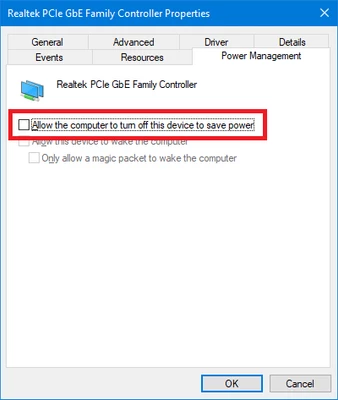
I prefer using Ethernet LAN network card for Creo licensing. If this card is not connected to LAN cable, then it is necessary to configure the card in Device Manager. See following picture.

MartinHanak_1-1675152056617.png


1 reply

24-Ruby III
January 30, 2023

@ML_7454596 wrote:

I have a node locked license of creo 3.0. My computer died and I am having trouble downloading and licensing the software on my new computer. Creo support is refusing to help because I don't have an active maintenance subscription. I was finally able to download the software when I found a link to the educational install - I'm hoping its the same. I downloaded my license file from ptc.com but it still has the mac address of my old computer. The installation software wouldn't let me license it. I tried putting the license file into the ptc folder mauall but that didn't work. I tried to manually change the mac address to match my new computer but I get the same error. What am I supposed to do?


Hi,

AFAIK you can transfer your license from old computer to new one.

Go to https://support.ptc.com/apps/licensePortal/auth/ssl/advsearch page.

MartinHanak_0-1675074195847.png

Enter old Host ID and click Search button.

Select your license in table and click Move License button.

Enter new Host ID and finish license transfer. You will receive new license file via email.

3-Newcomer
January 30, 2023

I was able to do that but the installation licensing still errors out. What do I do with this new license file?

3-Newcomer
February 5, 2023

Thank you so much for your help I really appreciate it.