
5-Regular Member
August 30, 2021
Solved

Model Tree Column Width Dragger

  • August 30, 2021
  • 1 reply
  • 4216 views

Hello,


Hovering over the column separators inside of the Creo model tree creates a context-sensitive dragger, allowing the user to resize the column:
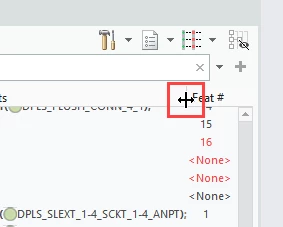
 

dragger.png


Does anyone know how to enlarge this area so it isn't so frustrating to click?  On a high resolution monitor, clicking an area the size of one pixel can be difficult.


Thanks,
Luke


Best answer by StephenW

That's too bad. Only other thought is I one time had issues with selections and it was due to a mouse speed or resolution setting in my mouse settings. But that corresponded with a specific change I had made to the settings.  If you've changed mouse or adjusted the setting recently, maybe that is a potential solution.

Other than that, I've got nothing!!

1 reply

23-Emerald III
August 30, 2021

I used to have the option PICK_APERATURE_RADIUS set to a value other the default which is now 7. I don't remember what that reason was.

I'm not sure this helps in your situation for the model tree column size, but it may. Be aware, it will adjust other pick selections, maybe negatively.

lukerb105-Regular MemberAuthor
5-Regular Member
August 31, 2021

Thanks for the response.  It would appear this setting doesn't have any effect, even when using very large values like 100.  Maybe it pertains to a specific context in the software.  There is a line for it in the config options document.

lukerb10_0-1630426863001.png


StephenW23-Emerald IIIAnswer
23-Emerald III
August 31, 2021

That's too bad. Only other thought is I one time had issues with selections and it was due to a mouse speed or resolution setting in my mouse settings. But that corresponded with a specific change I had made to the settings.  If you've changed mouse or adjusted the setting recently, maybe that is a potential solution.

Other than that, I've got nothing!!