
16-Pearl
March 6, 2024
Solved

Unique strat-in folder for each user who logs into the computer

  • March 6, 2024
  • 1 reply
  • 1136 views

Hi,


By default, the Creo installation defines the path for Start in as C:\Users\Public\Documents (marked in yellow).
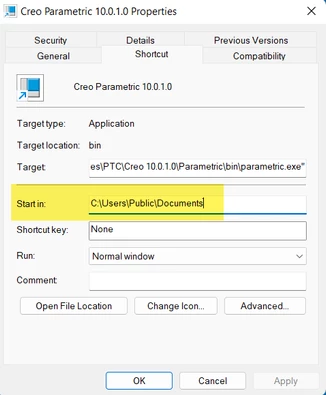
ProFeature_0-1709728120341.png

Our policy prohibits writing to the C:\Users\Public path, and each user can only write to their own path, which is C:\Users\USERNAME\Documents\.

How do you customize the path so that it is unique to each user who logs into the computer and launches Creo?

Best answer by dnordin

Just change the path to "C:\Users\%username%\Documents" and the environment variable will evaluate to each user's login name.


Regards,


Dan N.

1 reply

dnordin16-PearlAnswer
16-Pearl
March 6, 2024

Just change the path to "C:\Users\%username%\Documents" and the environment variable will evaluate to each user's login name.


Regards,


Dan N.

16-Pearl
March 6, 2024

Thank you @dnordin 


Is it possible to automatically create a "Creo" subfolder under Documents for each user as well?


Regards

16-Pearl
March 6, 2024

Not as part of the startup shortcut properties. If the "start in" folder doesn't exist, it will not be created.


You'd have to switch the startup icon "target" to use parametric.bat instead of parametric.exe, and then edit the parametric.bat file appropriately.


In the parametric.bat file, you need to:
check for the C:\Users\%username%\Documents\Creo folder
create it if it doesn't exist
send a message to the user that their configuration has been updated, and they need to restart Creo Parametric
then exit the parametric.bat file without starting Creo Parametric.


The second time the user runs the parametric.bat file the folder will already exist, and the script can continue to start Creo Parametric.


Regards,


Dan N.