
Solved
invalid host ID
I have installed creo 4.0. student version.
when run it, it says invalid Host id error in license.
I have reconfigured it many times and also got new license file every time.
what do I do now?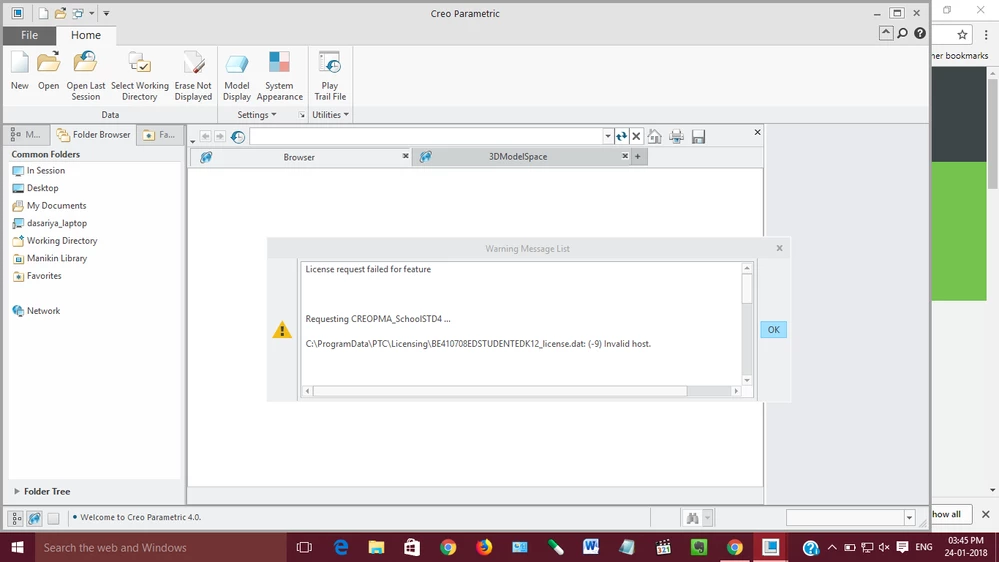

I have installed creo 4.0. student version.
when run it, it says invalid Host id error in license.
I have reconfigured it many times and also got new license file every time.
what do I do now?
You DO NOT replace HostID manually in license file. All codes in license file are generated by PTC generator using provided MAC address, so simple editing license file won't work.
After running ipconfig /all you should check, if HostID in license file matches any of physical addresses for network cards.If it doesn't, Windows doesn't see your network card and therefore Creo is unable to start, since license doesn't match. In that case you should investigate why the network card isn't available or generate new license file using physical address of one of existing network cards.
If there is a network card with MAC address matching HostID in license file, you may need to change the priority of network cards in Windows registry, to make Creo see the network card again.
Enter your E-mail address. We'll send you an e-mail with instructions to reset your password.