
16-Pearl
March 18, 2019
Solved

HoloLens problems with Textures in 8.4.1

  • March 18, 2019
  • 3 replies
  • 8730 views

Hi All,


I encountered a problem with the latest version of the View app on HoloLens after the update to 8.4.1 came late last week.


I had an experience created that used a textured model created from an FBX file.  The experience was working fine on the HoloLens using View 8.4.0, but after the update to 8.4.1, the view app crashes out when loading up the model Smiley Sad.  I had to create a new version of the experience that doesn't have any textures and that loads up fine.


This happened on 3 different HoloLens's all running the latest version of Windows and 2 of them have been recently reset with nothing on them apart from the View app.


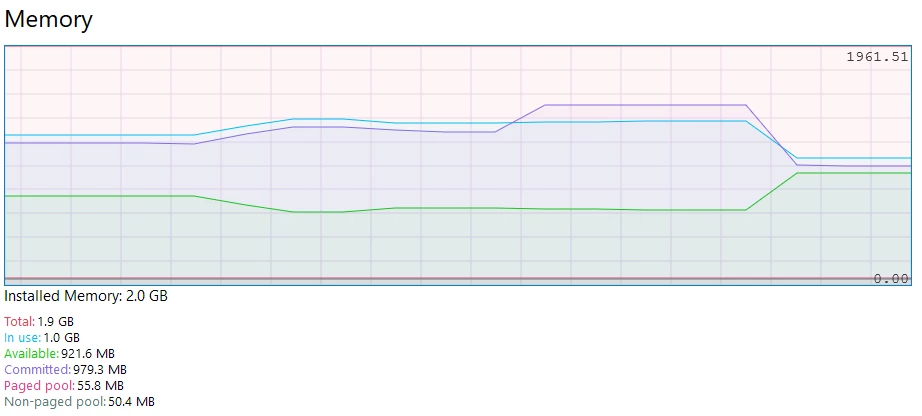
It's not a memory issue as the performance graph from the device portal shows.  You can see the the loading, and then the plateau when the app crashes and the drop when it exits out of view which is still way below the memory limit:
view_crash_01.png


It's not a global problem, as I have other experiences with textures that load up OK.  Attached are the QR codes for the two versions of the experience - with and without textures.  Unfortunately, I can't go back to the older version of the View app to try again. 


 @tmccombie  or @RolandRaytchev  is this something that R&D can look at as I believe it's a bug that has come in to 8.4.1.


Many thanks,


Allan

Best answer by AllanThompson

Well 8.4.3 was released and I'm very pleased to see that the problem has now been fixed.


8.4.0 - My model with textures worked Smiley Happy

8.4.1 - My model with textures crashed View Smiley Sad

8.4.2 - Textures support for HoloLens removed completely Smiley Frustrated

8.4.3 - Textures back and my model with textures works Smiley Very Happy


Thanks @RolandRaytchev for your help with this.

3 replies

21-Topaz I
March 19, 2019

Hi @AllanThompson ,


thanks for reporting this issue! I did fast check and did not find related issue in the PTC database. (key words: HoloLens Texture ) - so there are  some issues but not related to a different behavior between 8.4.0 and 8.4.1

I will test today or tomorrow  projects with texture coming form Creo Parametric so will try to reproduce the issue. In case that issue is not reproducible I will need your assistance to provide some model or project to reproduce the issue... but as mention I need to test first if this is a general issue with textures in the new release  

21-Topaz I
March 19, 2019

so tested the 2 QR codes  GT_HoloLens_shareQR.png  - here could reproduce the chrash of the vuforia view on the Hololens

the other QR code GT_HoloLens_No_Textures_shareQR - works fine  - but I see that this model seem to be complex. 

I have  Vuforia view 8.4.1 build  197. What was the datecode where are able to load the project QR code GT_HoloLens_No_Textures_shareQR ?

Seems to be there are  peak of the memory and network usage but I was observed  also such behavior when I am testing features which are working fine.

2019-03-19_11-52-06.gif


Could you reproduce the issue also with models having texture with less complexity?

16-Pearl
March 19, 2019

Hi Roland,


Unfortunately, I can't tell you the exact build version of View that I was running that worked with the textured experience, but it's the version that was available on Wednesday last week from the Windows Store as I had to install it on two of the three HoloLenses that I was using for the first time on Wednesday.  On Friday morning my time, the new version was available, and I updated the third HoloLens with this version and started having the problem.  Then on Saturday the other two must have updated automatically (I don't own them or have them now) as they also started having the problem.


I've tested some other models that use textures and these are working fine.


While I agree that it's a relatively complex model for the HoloLens, the issue is that the experience was working fine in the 8.4.0 version of View and then after updating to 8.4.1 - something that unfortunately you can't control on a Developer edition of the HoloLens, the same experience crashes out every time when loading.  And looking at the memory trace on mine, it crashes out before it even maxes out the RAM usage.  Maybe it tries to load the textures and it fails as there's not enough available RAM?


Regards,


Allan

16-Pearl
April 11, 2019

So 8.4.2 has been released and I've updated the View app on my HoloLens and the Studio software on my laptop.  Very disappointingly, it looks like textures don't work at all on the HoloLens now Smiley Sad 


I tried a few different experiences and they all have this issue.  I tried republishing them with the updated version of Studio - still no textures.  I also created a new experience - still no textures.


And of course now that I've updated my app to 8.4.2, I can't go back to 8.4.1.


Not happy Jan.

AllanThompson16-PearlAuthorAnswer
16-Pearl
May 9, 2019

Well 8.4.3 was released and I'm very pleased to see that the problem has now been fixed.


8.4.0 - My model with textures worked Smiley Happy

8.4.1 - My model with textures crashed View Smiley Sad

8.4.2 - Textures support for HoloLens removed completely Smiley Frustrated

8.4.3 - Textures back and my model with textures works Smiley Very Happy


Thanks @RolandRaytchev for your help with this.