1-Visitor
February 6, 2019
Solved

How to delete a view in vufoira studio?

  • February 6, 2019
  • 1 reply
  • 2605 views

Hi there,

how can I delte an second view which I created but not use anymore?

Thanks for help!

Best answer by sdidier

Hello,


Please follow these steps :

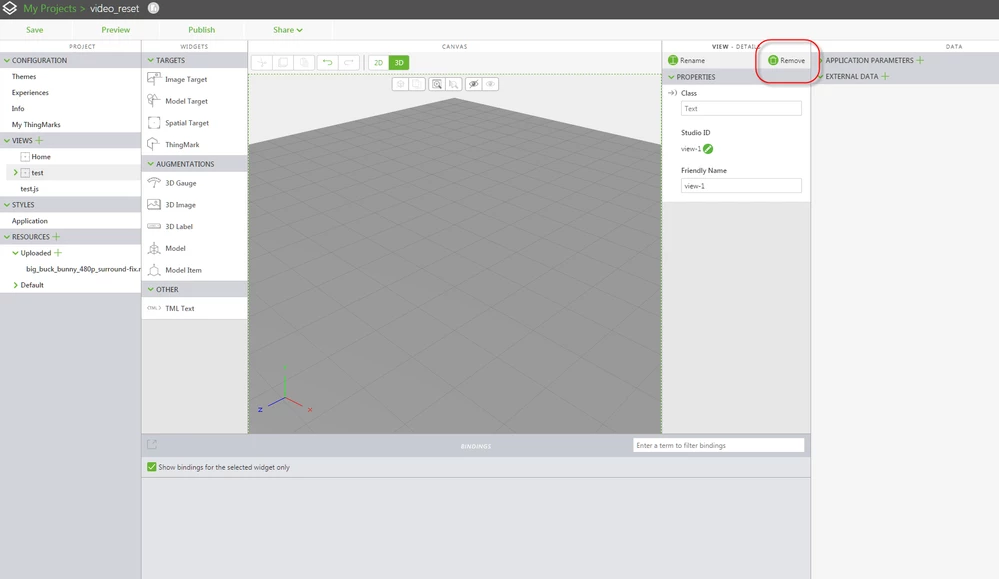
  1. In Vuforia Studio, in your Project, in the Project panel (at left), in VIEWS category
  2. Select the View to delete
  3. At right, in the VIEW - DETAILS panel, click the Remove buttonVuforia_View_delete_view.png
  4. In the Delete View dialogbox, click the Delete button to confirm deletion of this View

Best regards,

Sam


1 reply

sdidier17-PeridotAnswer
17-Peridot
February 6, 2019

Hello,


Please follow these steps :

  1. In Vuforia Studio, in your Project, in the Project panel (at left), in VIEWS category
  2. Select the View to delete
  3. At right, in the VIEW - DETAILS panel, click the Remove buttonVuforia_View_delete_view.png
  4. In the Delete View dialogbox, click the Delete button to confirm deletion of this View

Best regards,

Sam


16-Pearl
February 7, 2019

Do you also know how to change the name of a view?

And how to copy a view would be nice 😃

17-Peridot
February 7, 2019

Hello,


To rename a View, follow the same steps, execpt at the step 3, click the Rename button.


To copy a View, saddly this feature doesn't exist today.


Best regards,

Samuel